Build

JHAs reviewed and signed, without the paper chase

Subs send their JHAs through a link or build one on their phone. Your superintendent checks each one against your review checklist, and workers read and sign it during their orientation. Every signature is recorded.
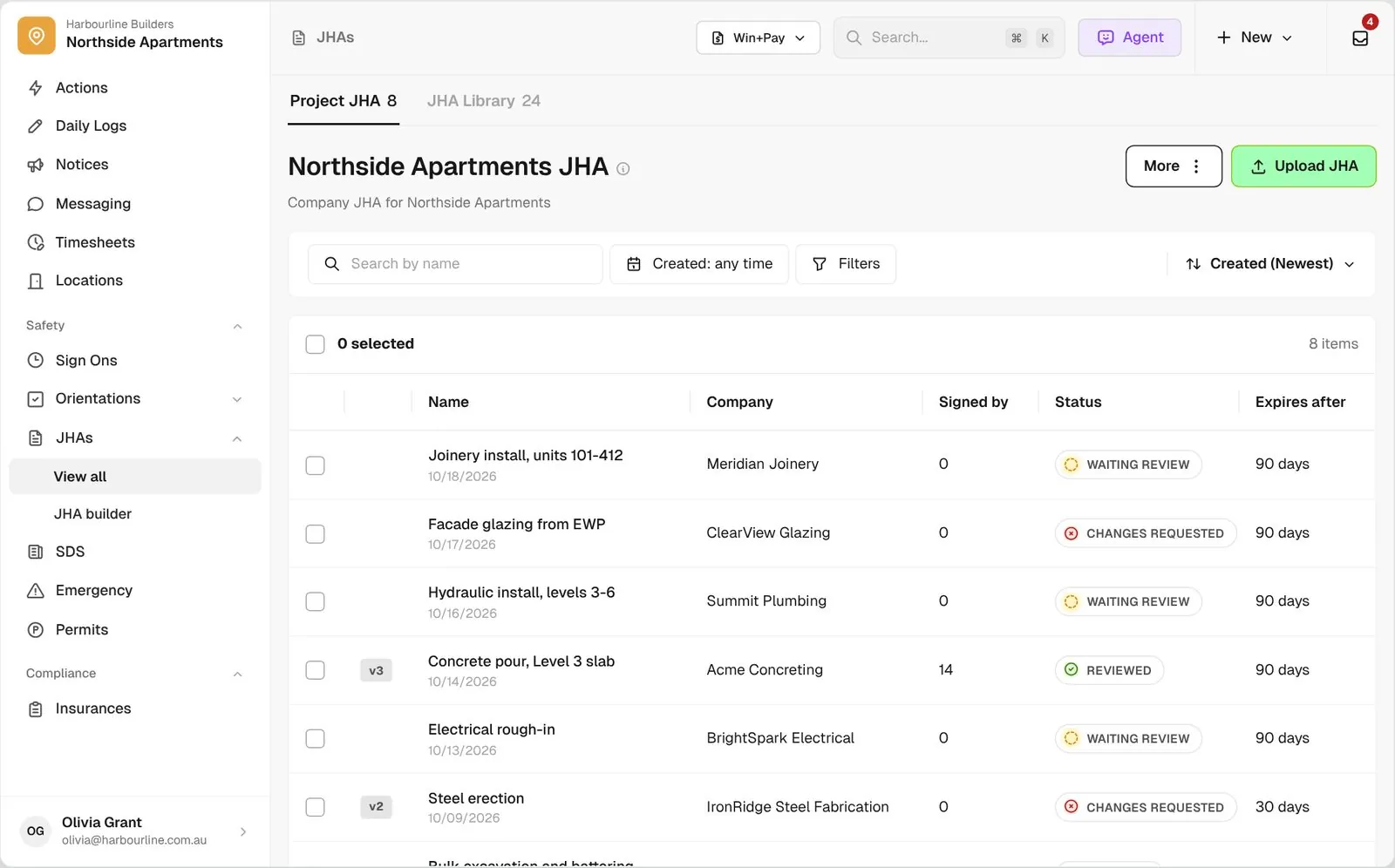
SWMS list for Northside Apartments showing review status for each company

Trusted by builders across the country

From custom-home contractors to commercial general contractors, field teams run their safety paperwork on BuildPass.


Reidy Contracting Group
Ameresco
DivisionOne Construction
Burkentine Builders
Ready Construction
DD Construction
Honest Hammer
Homestead
Copeland Construction
RMA Commercial General Contractors
Dryden Custom Homes
Reidy Contracting Group
Ameresco
DivisionOne Construction
Burkentine Builders
Ready Construction
DD Construction
Honest Hammer
Homestead
Copeland Construction
RMA Commercial General Contractors
Dryden Custom Homes
Reidy Contracting Group
Ameresco
DivisionOne Construction
Burkentine Builders
Ready Construction
DD Construction
Honest Hammer
Homestead
Copeland Construction
RMA Commercial General Contractors
Dryden Custom Homes
Reidy Contracting Group
Ameresco
DivisionOne Construction
Burkentine Builders
Ready Construction
DD Construction
Honest Hammer
Homestead
Copeland Construction
RMA Commercial General Contractors
Dryden Custom Homes
Fassberg
AJFX Construction
ECI Austin
New Age Builder
EDG Pro Contractors
Schwartz Custom Homes
ARK General Construction
Two Z Homes
Shade Doctor of El Paso
Fassberg
AJFX Construction
ECI Austin
New Age Builder
EDG Pro Contractors
Schwartz Custom Homes
ARK General Construction
Two Z Homes
Shade Doctor of El Paso
Fassberg
AJFX Construction
ECI Austin
New Age Builder
EDG Pro Contractors
Schwartz Custom Homes
ARK General Construction
Two Z Homes
Shade Doctor of El Paso
Fassberg
AJFX Construction
ECI Austin
New Age Builder
EDG Pro Contractors
Schwartz Custom Homes
ARK General Construction
Two Z Homes
Shade Doctor of El Paso

JHA software helps general contractors collect job hazard analysis forms (JHAs, also called JSAs) from subcontractors, review them against a checklist, and keep a record of which workers have read and signed them.

One JHA process, from the sub’s upload to the worker signing it

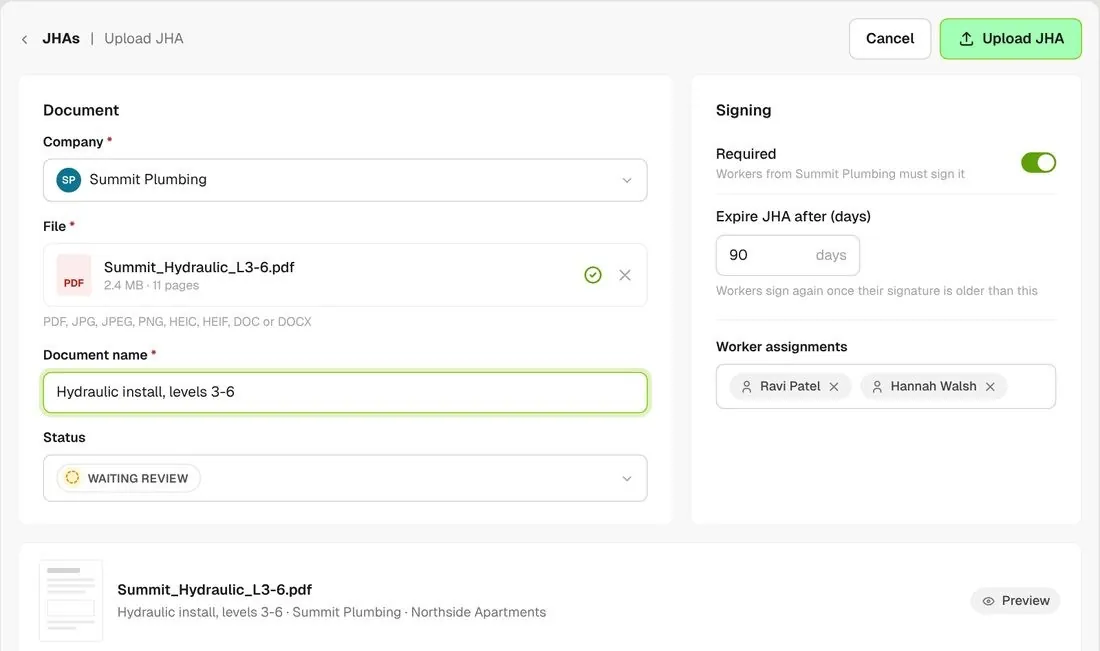
Upload form with company, file, review status and signing settings
01

Subs send it in

Send a sub or GC a request link. They upload their JHA or fill it in with no BuildPass login, and it lands on your project waiting for review.
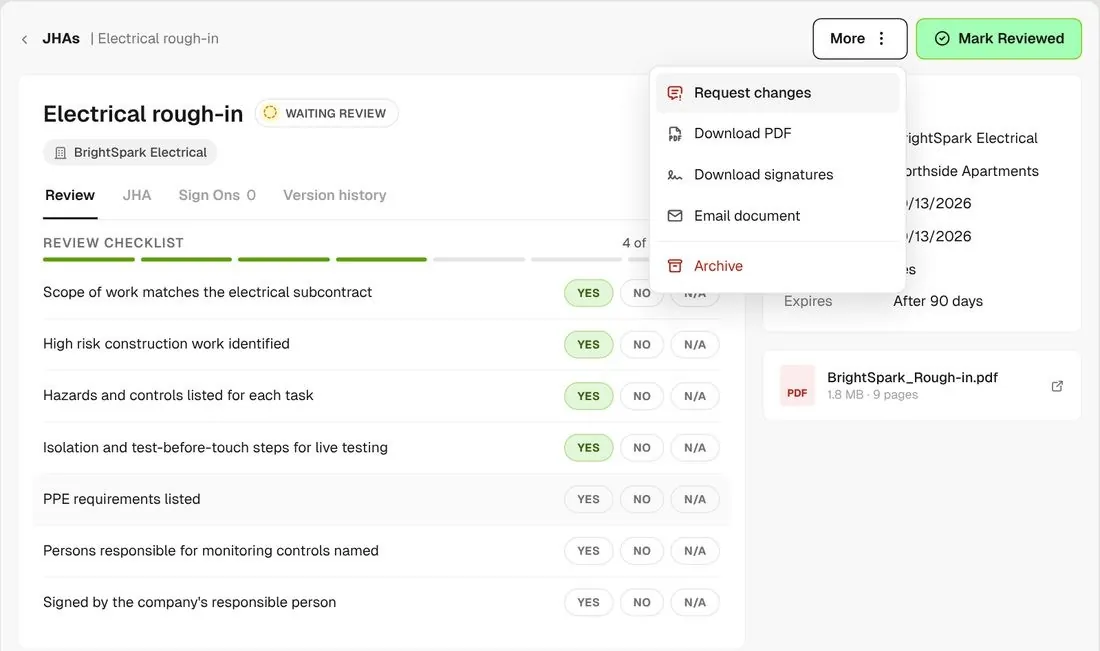
SWMS review checklist half complete with Mark reviewed button
02

You review it

Work through your own review checklist on each JHA, then mark it reviewed or send it back with notes. The company gets an email with your changes.
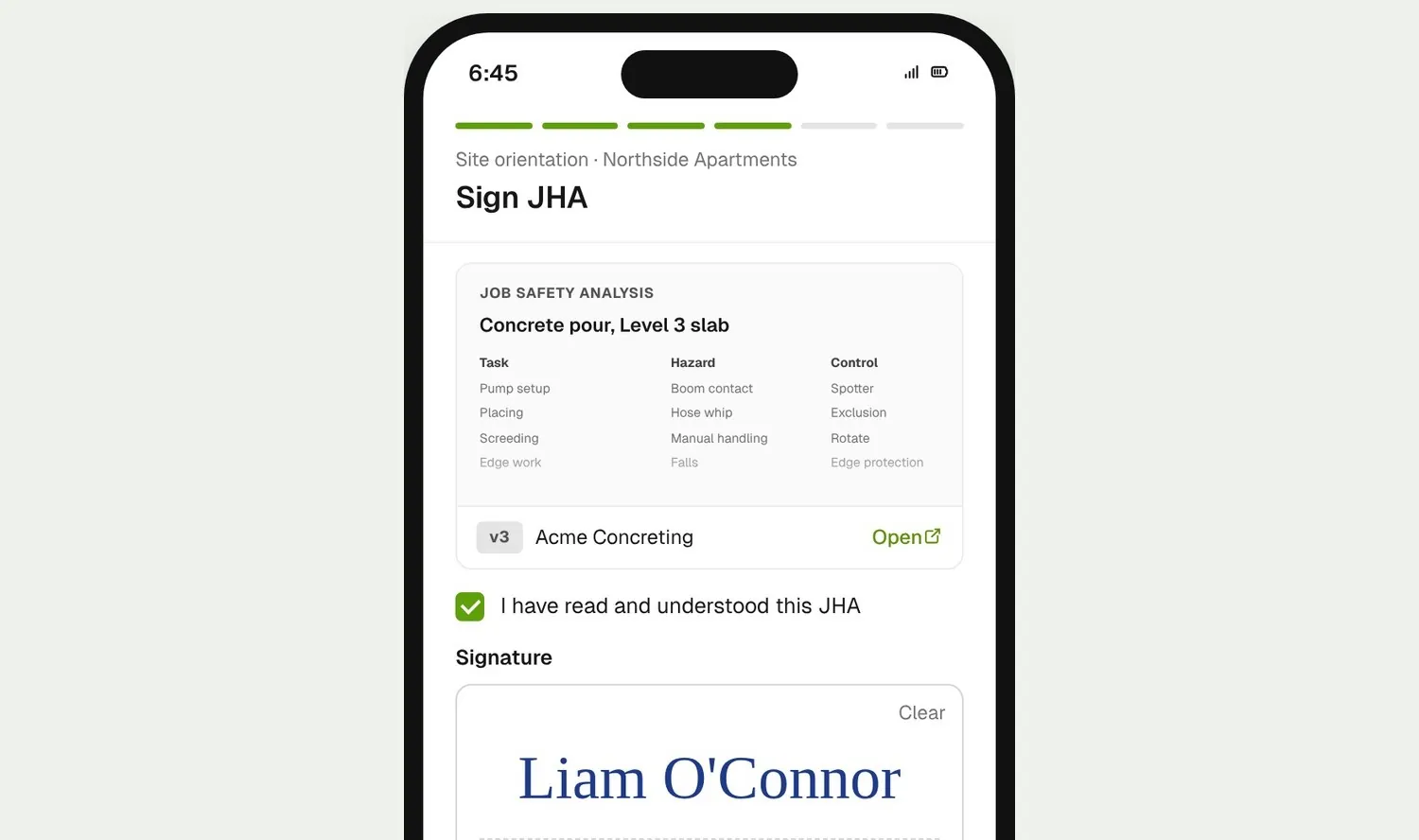
Worker signing a SWMS on their phone during induction
03

Workers sign it

Workers only see JHAs you have reviewed. They read and sign the ones that apply to them on their phone during their orientation.

How it works

Your whole JHA register, in one clear view

See who signed what, keep every version, and pull the record together when someone asks for it.
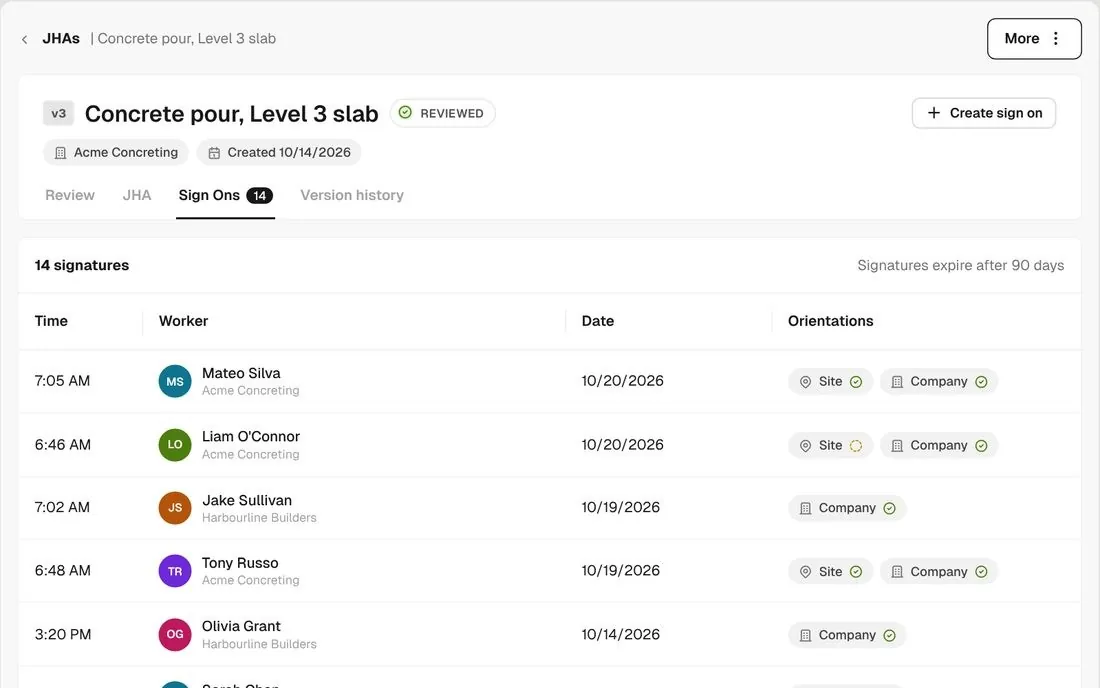
Sign Ons tab listing each worker who signed with date and time

See who signed, and when

Each JHA lists every worker who signed it, with the date and time.
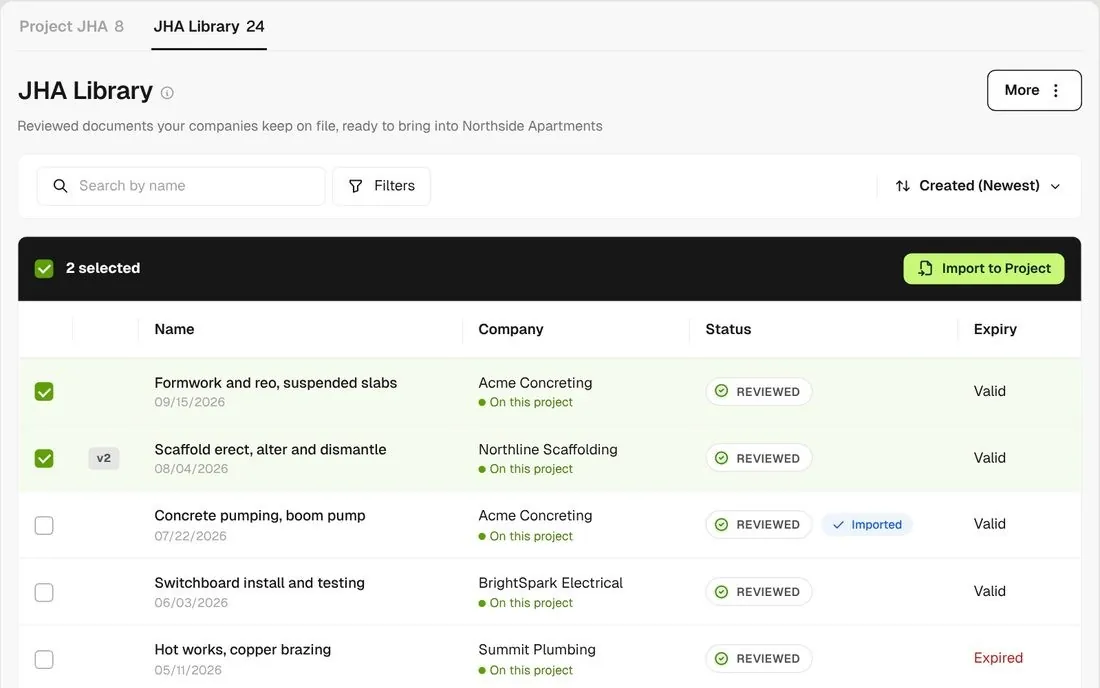
SWMS library with Import to project

Reuse JHAs across projects

Keep the JHAs you use again in a library and import them into the next project.
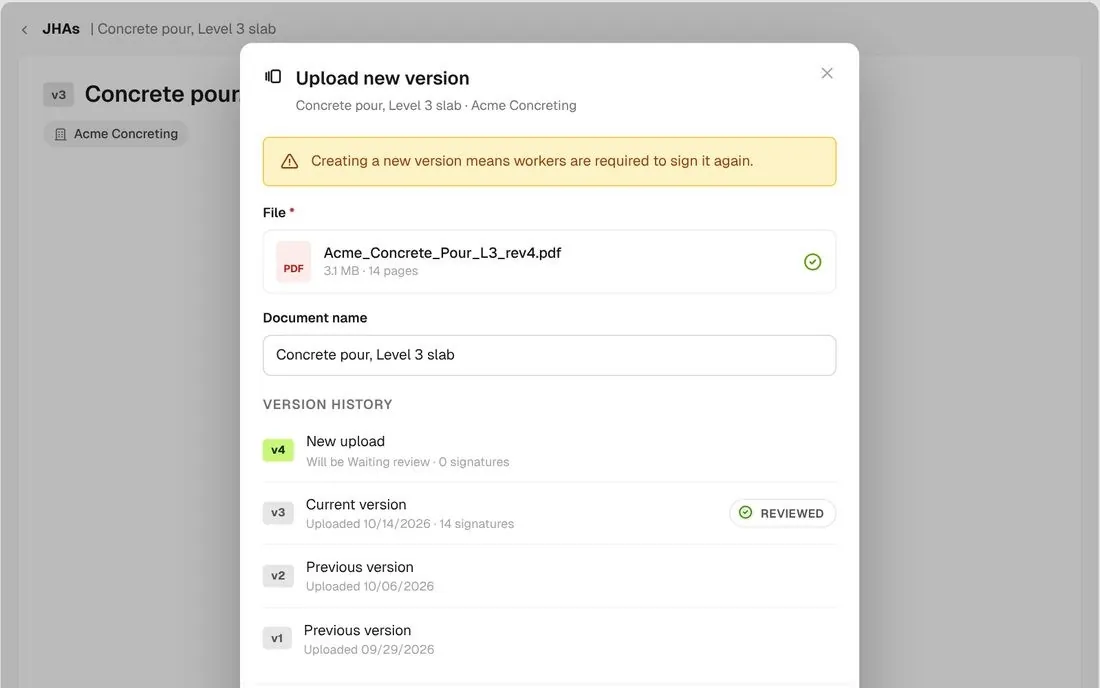
Upload new version warning that workers must sign again

New version, new signatures

Upload a revised JHA onto the same record. Workers are asked to sign the new version, and earlier versions stay in the history.
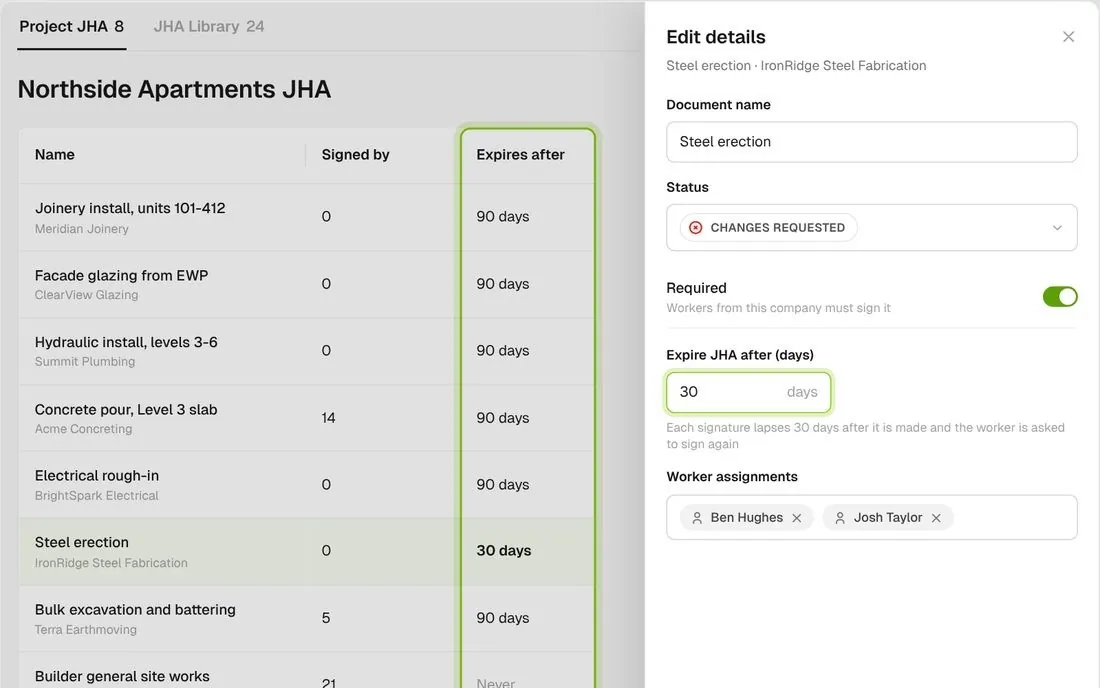
Expire after setting and expiry column

Set a re-sign period

Choose how many days a signature lasts. Once it lapses, workers are asked to sign again, and your project admins hear about anyone who opens it without signing.
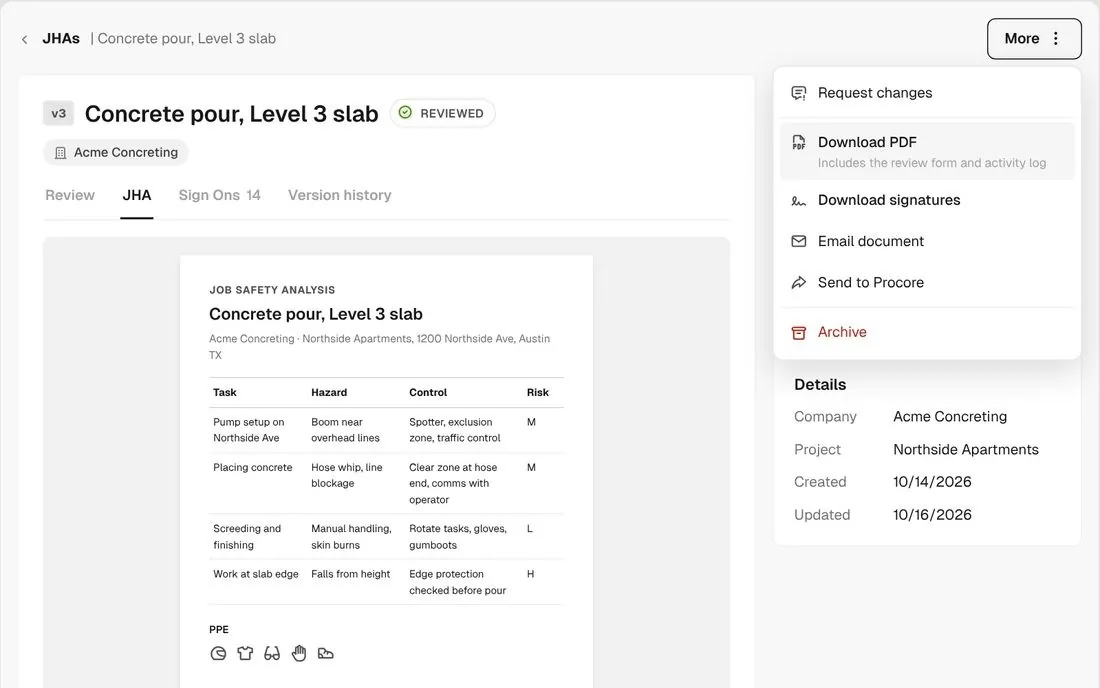
Action menu with download PDF, download signatures, email and send to Procore

Download the record

Download the JHA with its review checklist and activity log, a PDF of every signature, or, if you use Procore, send it there.
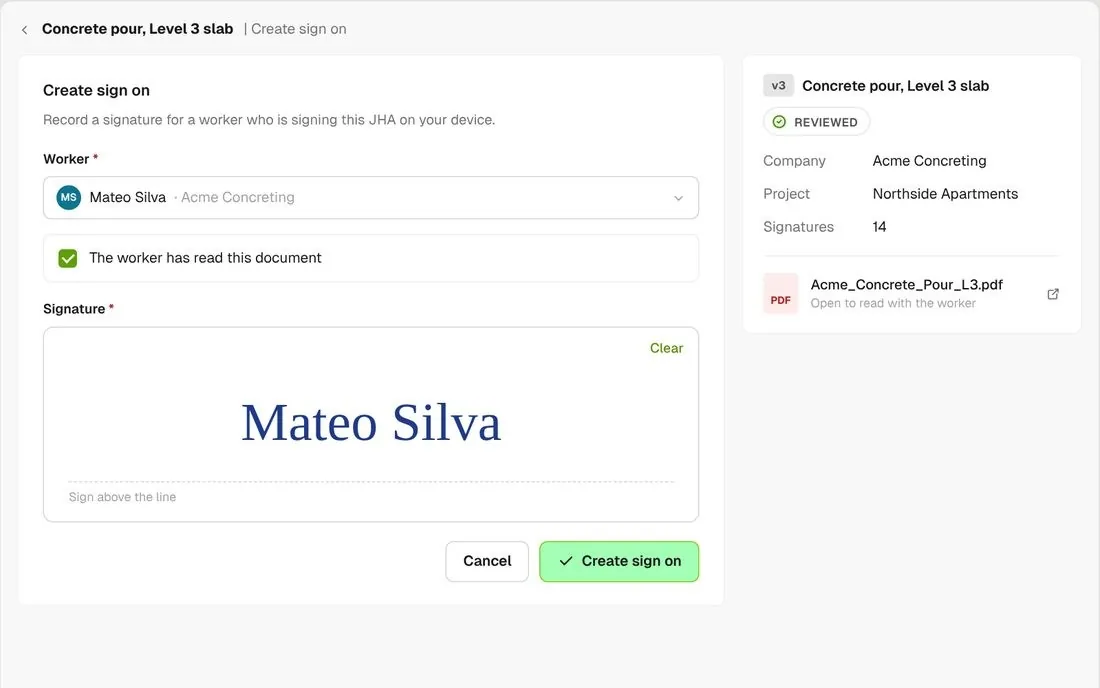
Create sign-on form with worker, read confirmation and signature

Sign for workers without a phone

If a worker signed a paper copy or has no phone, you can record their signature against the JHA.

Connected to the whole job
BuildRun the site

JHAs, part of the whole job

JHA requests go out with the rest of a company’s documents, like insurance certificates and SDS. Required JHAs are signed inside the orientation, and you can stop workers finishing their orientation until their company has a reviewed JHA on the project.

Explore health and safety
  1. Document requestJHA + insurance + SDSone link per company
  2. ReviewReviewedyour checklist, one reviewer
  3. SIGNED IN THE ORIENTATION14 signaturesConcrete pour, Level 3 slab · v3. Acme Concreting crew, Northside Apartments

Win

Price the job

Take off, estimate and get proposals out the door, without rekeying the same numbers three times.

Explore preconstruction

Pay

Manage the money

Budgets, commitments, pay applications and bills, so you see the real financial position of every job.

Explore finance

Connect

Connect the tools

Bring your other tools, your phone line and BuildPass AI into the same workflow.

Explore the AI toolkit

Trusted by builders who run their projects on BuildPass

From custom-home builders to commercial general contractors, teams across the United States run their projects on BuildPass every day.


Whether you're a local builder doing a handful of houses a year, or you're pushing for four or five digits, there's a solution here. And BuildPass can handle it.
Joel Patterson
Director of Construction, Burkentine Builders
It's a one-stop shop for construction safety. Everything you need is right there.
Jack Hensey
Business Operations Associate, Reidy Contracting Group
This is working much better with BuildPass. Much faster. Much cleaner.
David Guzman
Superintendent, Engen Contracting Inc.

Frequently asked questions

Yes. Send them a request link and they can upload their JHA or fill in the JHA form without a BuildPass login. You can also upload a JHA on their behalf.

Yes. The review checklist is a template you edit yourself. Set one default for every project, or connect a different checklist to a single project.

Upload it onto the existing JHA. It becomes a new version, workers are asked to sign it again, and the version history keeps the earlier copies.

Not by default. Workers read and sign the JHA during their orientation. For a hard stop, turn on the setting that stops workers completing their orientation until their company has a reviewed JHA on the project.

See how BuildPass works on your projects

Book a demo and we'll walk your team through it.