
















Build

Log the day in the field, AI writes the owner report

Construction daily log app with AI daily reports for owners

BuildPass daily log software creates each day’s log at start time, with workers, hours and weather. Your superintendent talks or types the day’s work from any browser, and the AI summary rolls any week or month into an owner PDF.

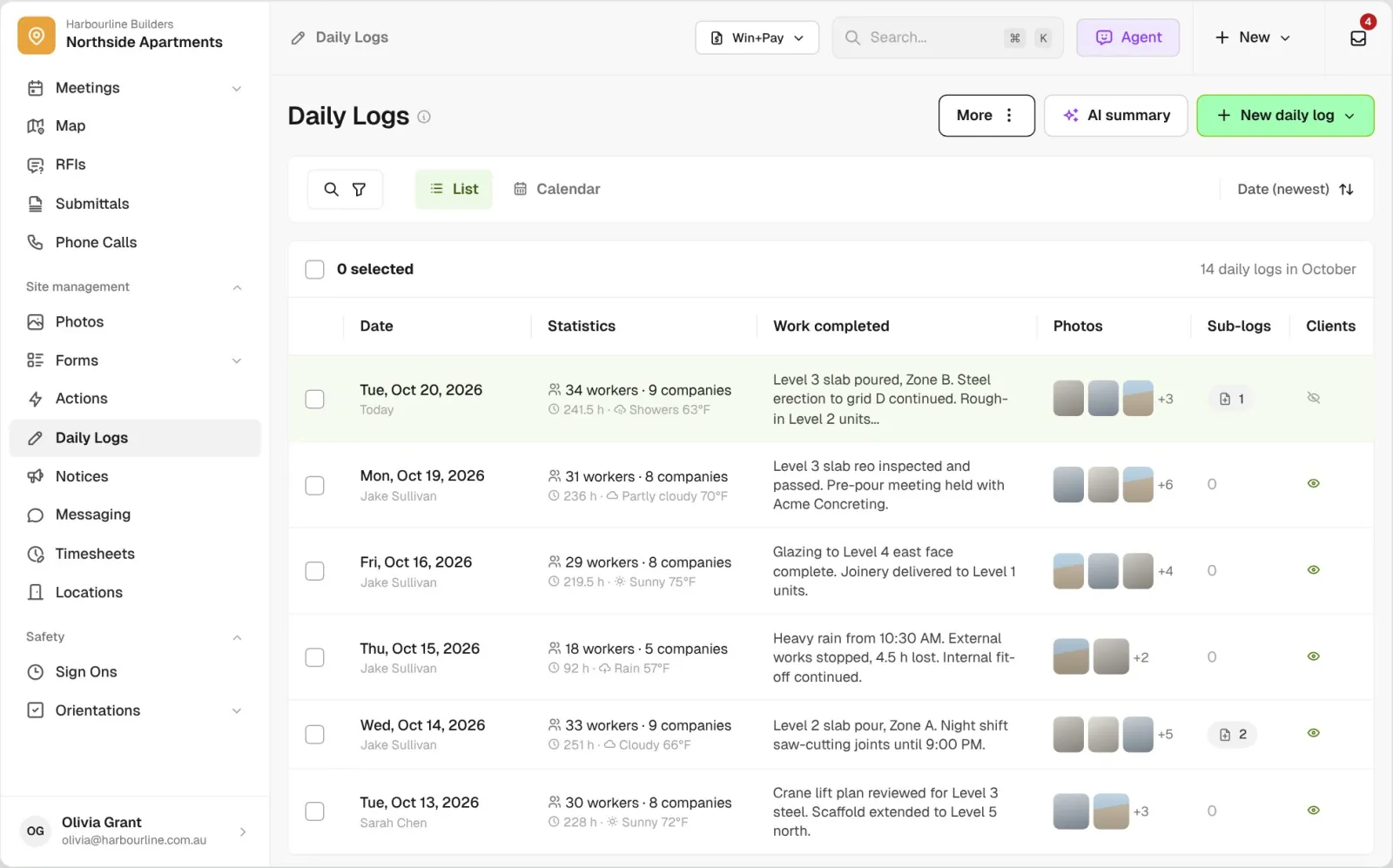
Site Diaries list for Northside Apartments showing each day with worker and company counts, hours, weather, work completed, photo thumbnails, sub-log count and whether the client can see it

Trusted by builders across the country

From custom-home contractors to commercial general contractors, superintendents keep their daily logs in BuildPass every day.

Reidy Contracting Group
Ameresco
DivisionOne Construction
Burkentine Builders
Ready Construction
DD Construction
Honest Hammer
Homestead
Copeland Construction
RMA Commercial General Contractors
Dryden Custom Homes
Reidy Contracting Group
Ameresco
DivisionOne Construction
Burkentine Builders
Ready Construction
DD Construction
Honest Hammer
Homestead
Copeland Construction
RMA Commercial General Contractors
Dryden Custom Homes
Reidy Contracting Group
Ameresco
DivisionOne Construction
Burkentine Builders
Ready Construction
DD Construction
Honest Hammer
Homestead
Copeland Construction
RMA Commercial General Contractors
Dryden Custom Homes
Reidy Contracting Group
Ameresco
DivisionOne Construction
Burkentine Builders
Ready Construction
DD Construction
Honest Hammer
Homestead
Copeland Construction
RMA Commercial General Contractors
Dryden Custom Homes
Fassberg
AJFX Construction
ECI Austin
New Age Builder
EDG Pro Contractors
Schwartz Custom Homes
ARK General Construction
Two Z Homes
Shade Doctor of El Paso
Fassberg
AJFX Construction
ECI Austin
New Age Builder
EDG Pro Contractors
Schwartz Custom Homes
ARK General Construction
Two Z Homes
Shade Doctor of El Paso
Fassberg
AJFX Construction
ECI Austin
New Age Builder
EDG Pro Contractors
Schwartz Custom Homes
ARK General Construction
Two Z Homes
Shade Doctor of El Paso
Fassberg
AJFX Construction
ECI Austin
New Age Builder
EDG Pro Contractors
Schwartz Custom Homes
ARK General Construction
Two Z Homes
Shade Doctor of El Paso

Construction daily log software helps general contractors and superintendents record each day on the jobsite, including work completed, attendance, weather, delays and photos, and share it with the owner or office as a PDF.

From the start of the day to the client portal

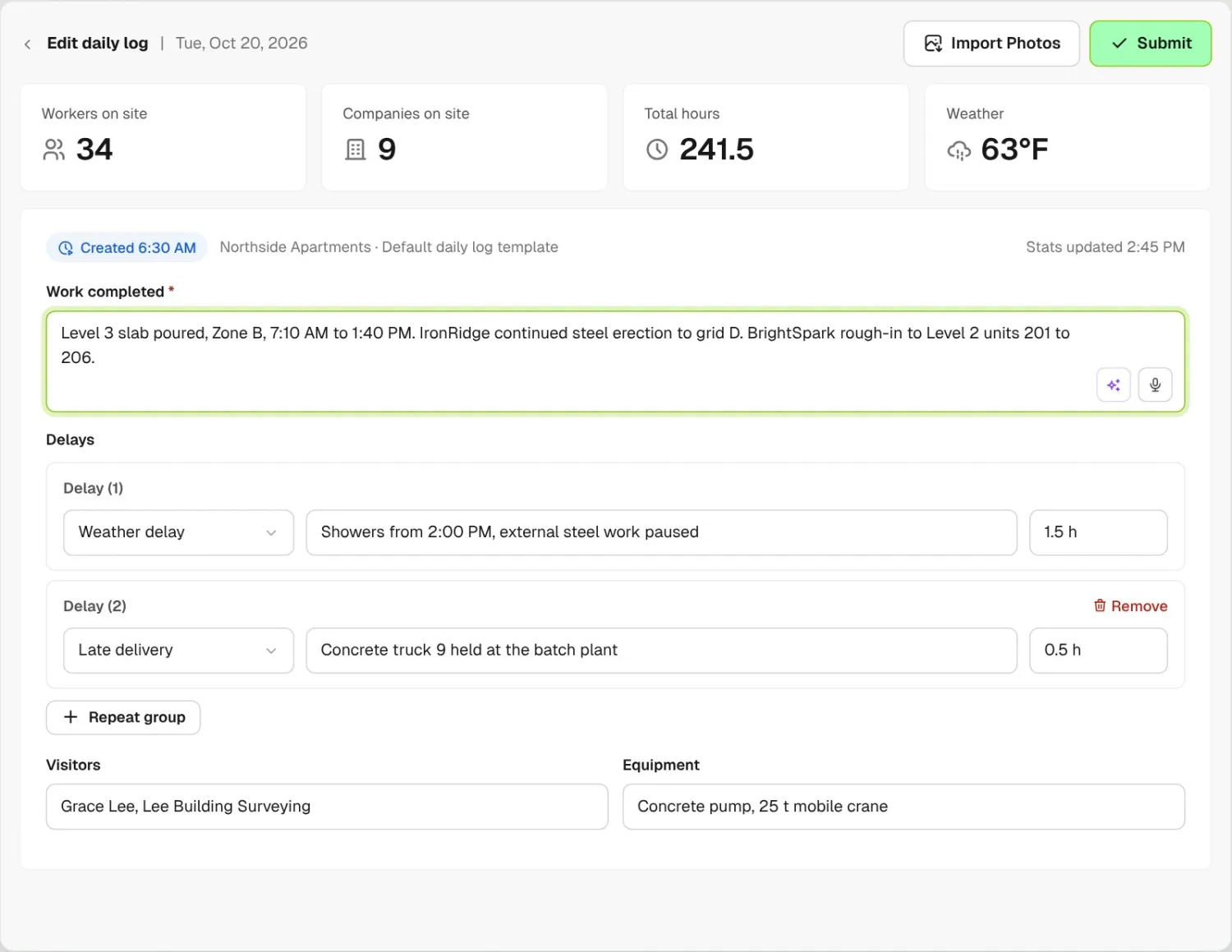
Today's site diary opened at 6:30 AM with workers, companies, hours and weather filled in, the work completed field and a delay register
01

Created for you

Each morning BuildPass creates the day’s log at the project’s start time, on your own template. Worker, company and hour counts come from sign ons, visitors show their times and reason for visit, and the day’s weather sits beside them.
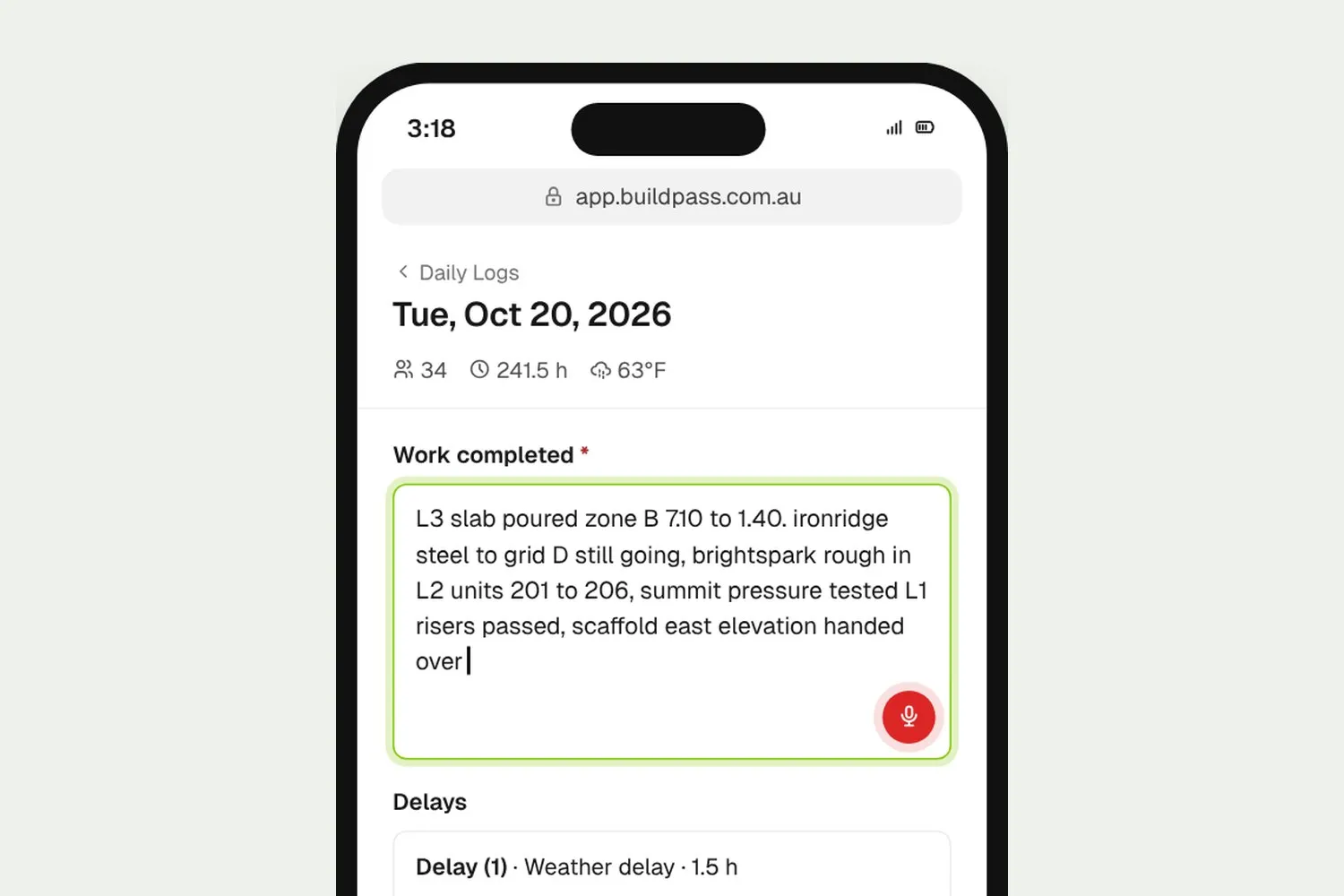
Site manager dictating the day's work into the diary from a phone browser, with delays, visitors and plant below
02

Talk it through

Dictate the day’s work from your phone browser and the words land in the field as you speak. Add delays, visitors and equipment in the same form.

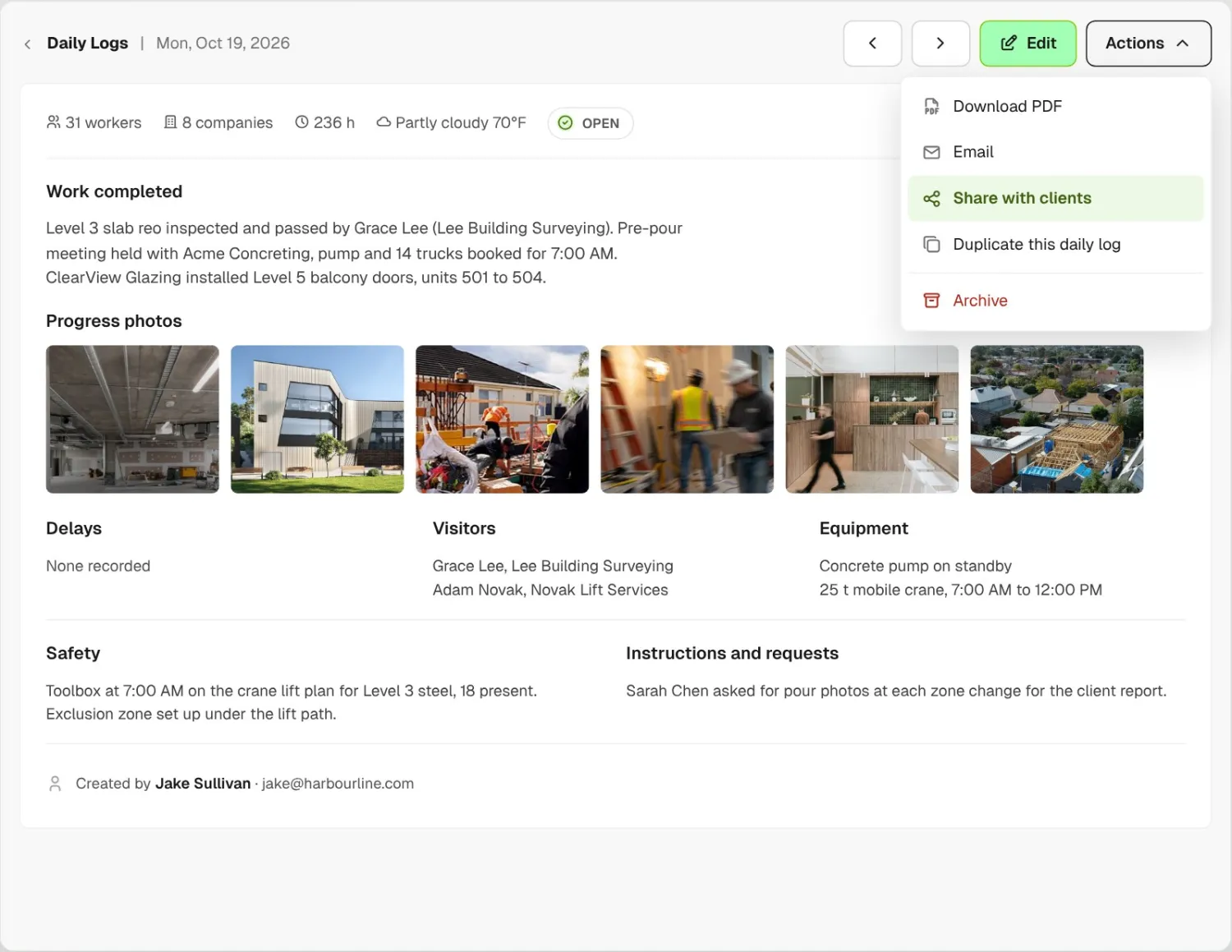
Site diary detail for 19 October with six real progress photos and the actions menu open on Share with clients, Email and Download PDF
03

Share it

Share the log to the client portal, email it as a PDF or download it. Turn on auto sharing and every log goes to the client portal at 7am the next day.

How it works

Every daily log on the project, in one view

See each day’s workers, hours, weather, photos and sub-logs in a list or a calendar, and which logs the owner can see.

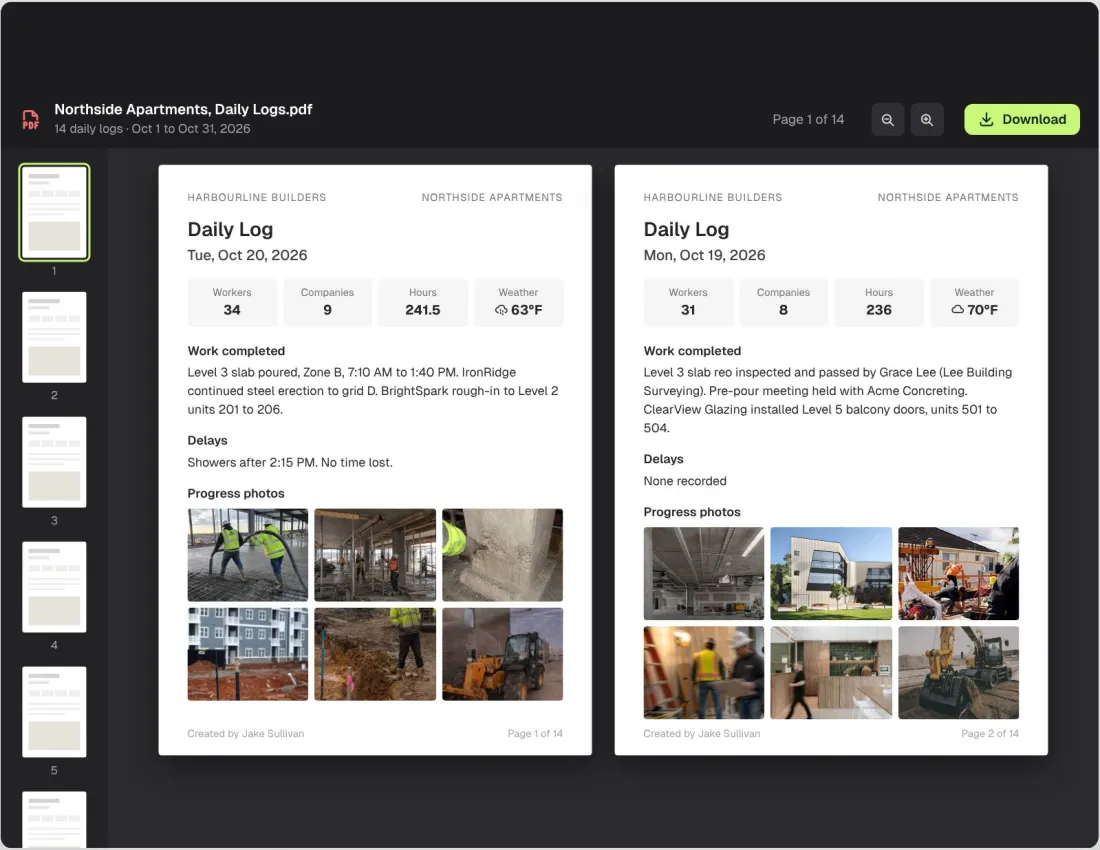
October's 14 site diaries merged into one PDF, open at page 1 of 14 with the 20 and 19 October diaries side by side, each with workers, hours, weather, work completed, delays and progress photos

A month of logs in one PDF

Filter the list to the dates you need and export every log into one PDF for a delay claim or the owner. It arrives in your BuildPass inbox.

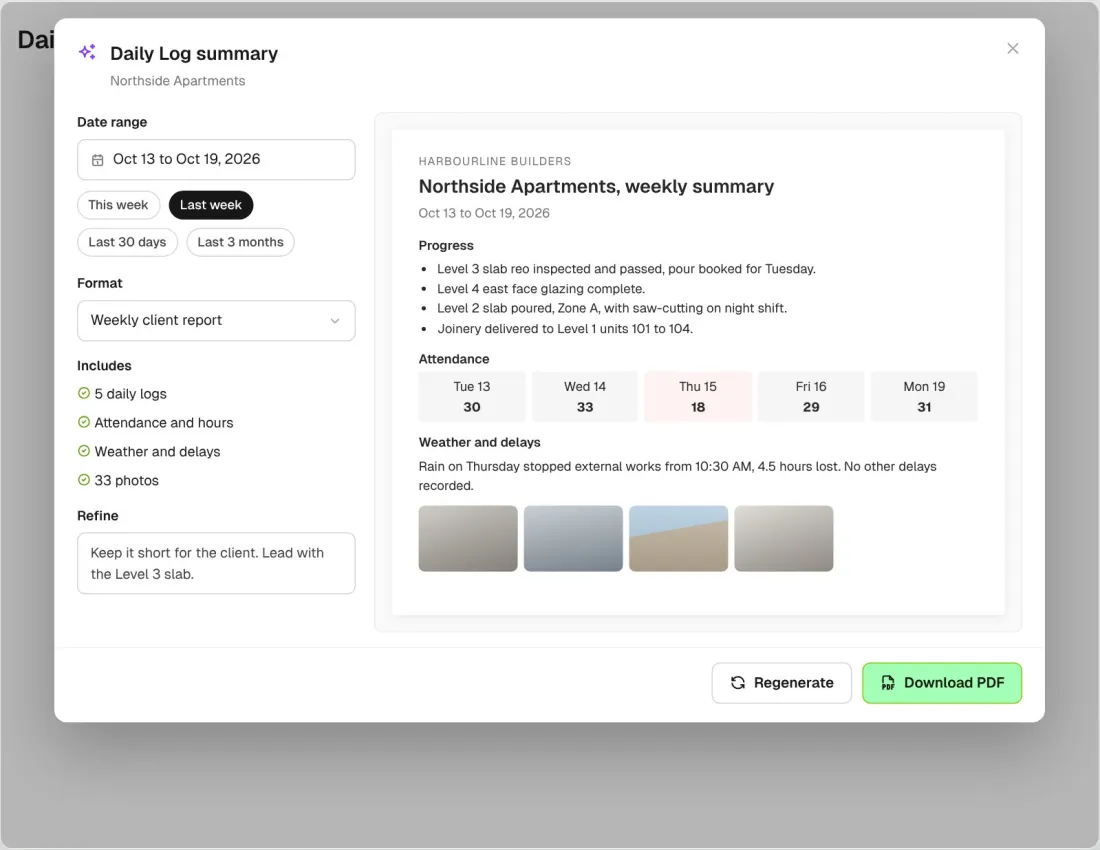
AI site diary summary for 13 to 19 October with progress, attendance, weather and photos, a Refine box, Regenerate and Download PDF

An owner report for any range

Pick a week, a month or up to three months and the AI daily log summary drafts a report with progress, attendance, weather and photos. Refine the draft and download the PDF.

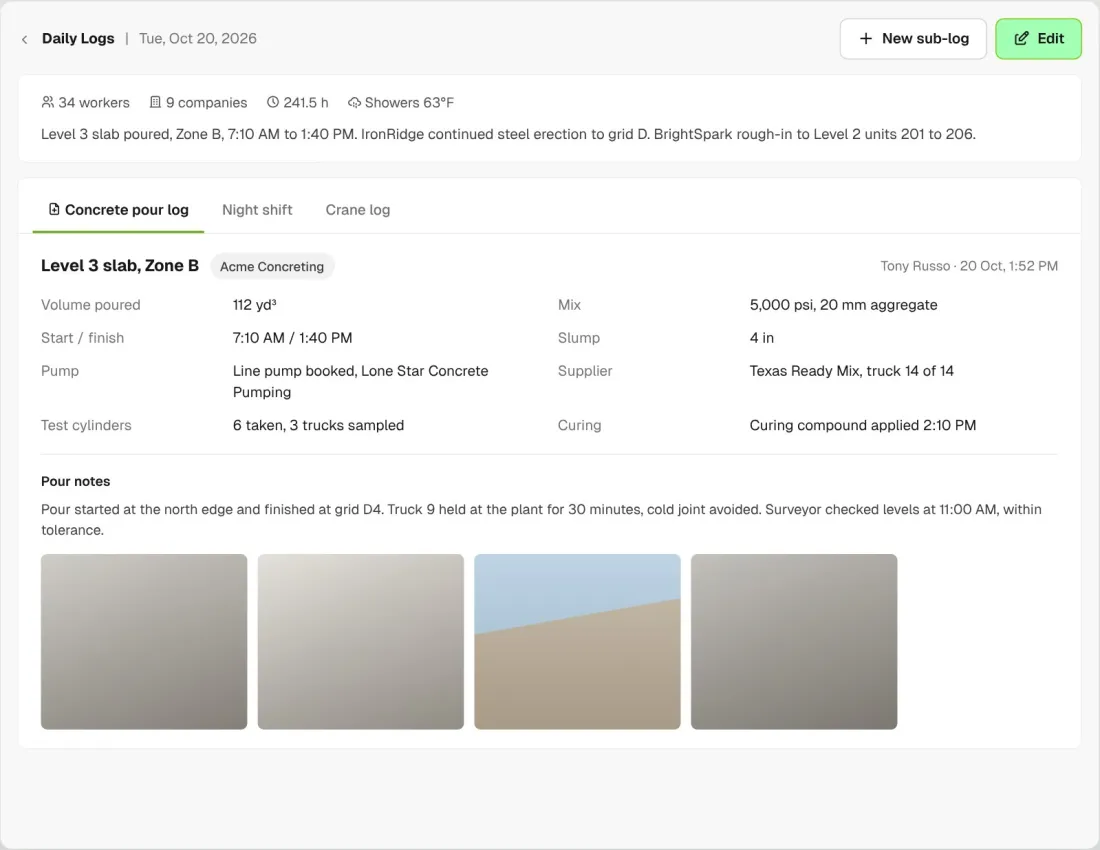
Concrete pour log sub-log on the day's diary with volume, mix, slump, pump, supplier and test cylinders

Add sub-logs to the day

Attach extra logs to the day’s log for a concrete pour, a night shift or a crane log, each on its own template.

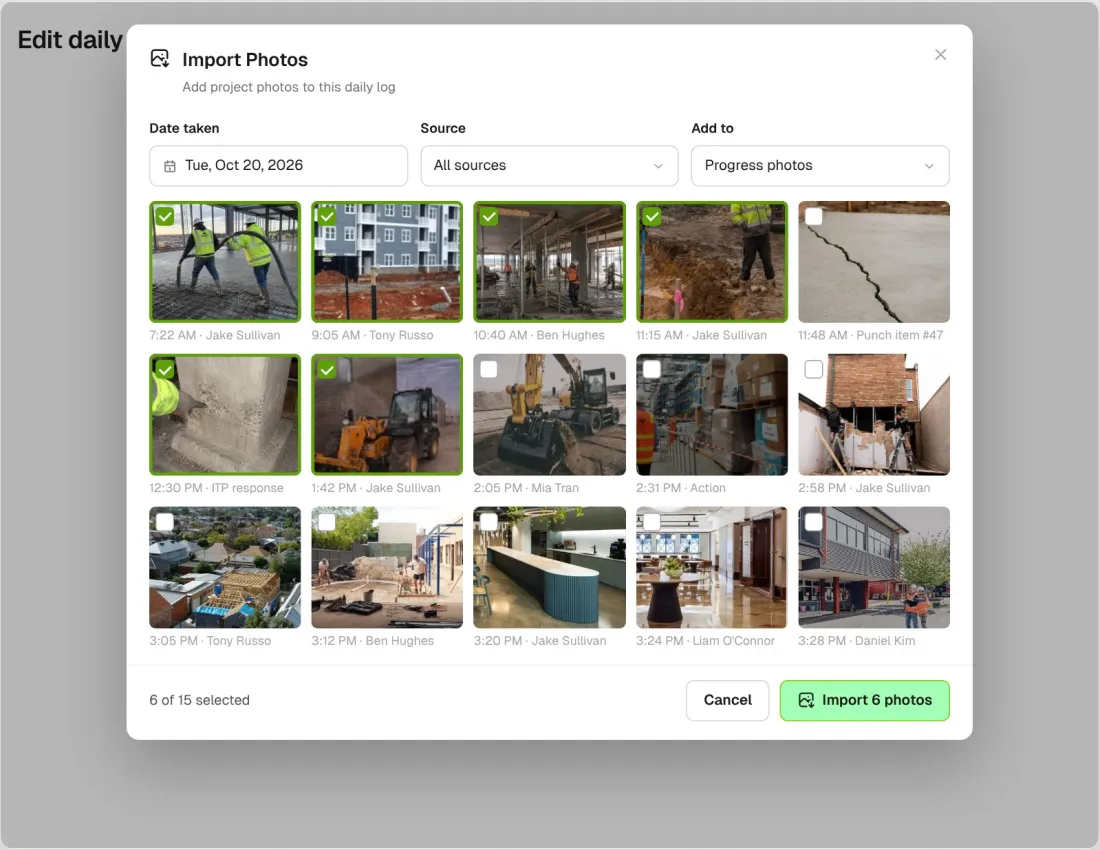
Import Photos window filtered to photos taken on 20 October, showing 15 real site photos with six selected to add to the diary

Pull in the day’s photos

Import project photos into the log by the date they were taken, including photos from punch items, forms and actions.

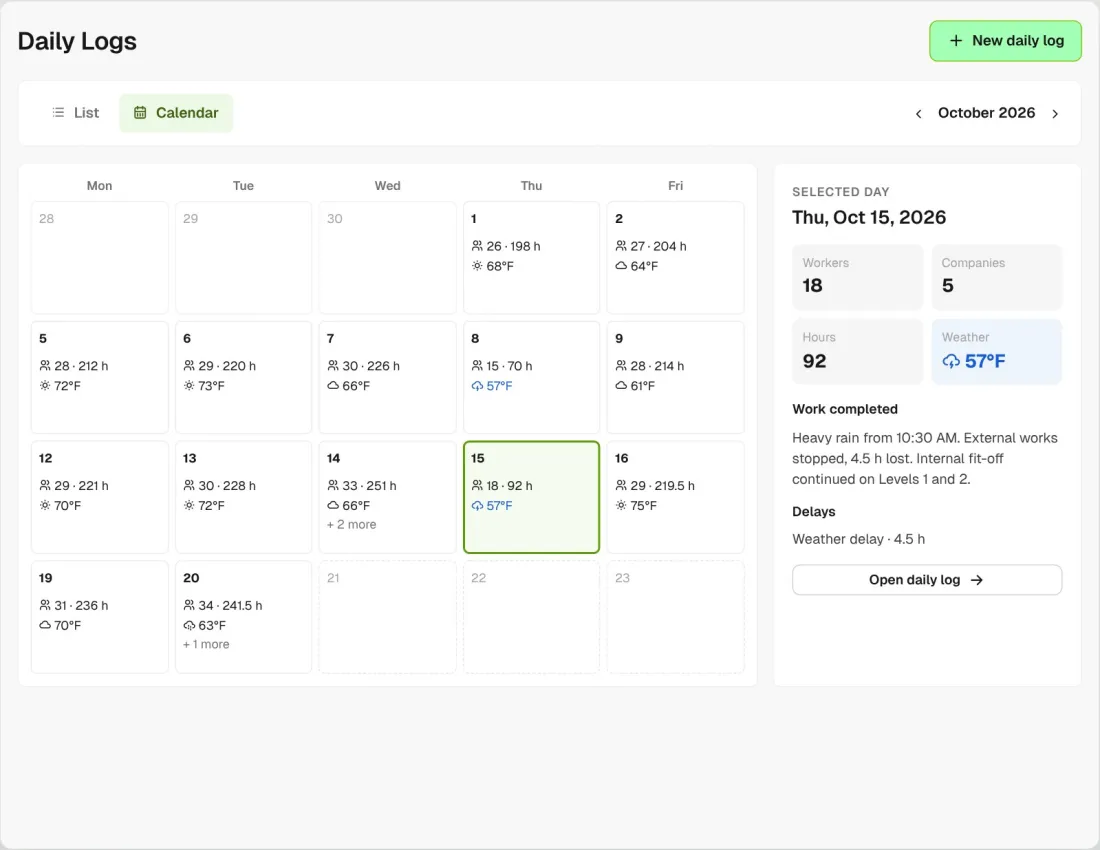
Calendar view of October with workers, hours and weather on each day and the rain day selected

See the month at a glance

The calendar shows workers, hours and weather for every day, so rain days stand out. Open any day to read its log.

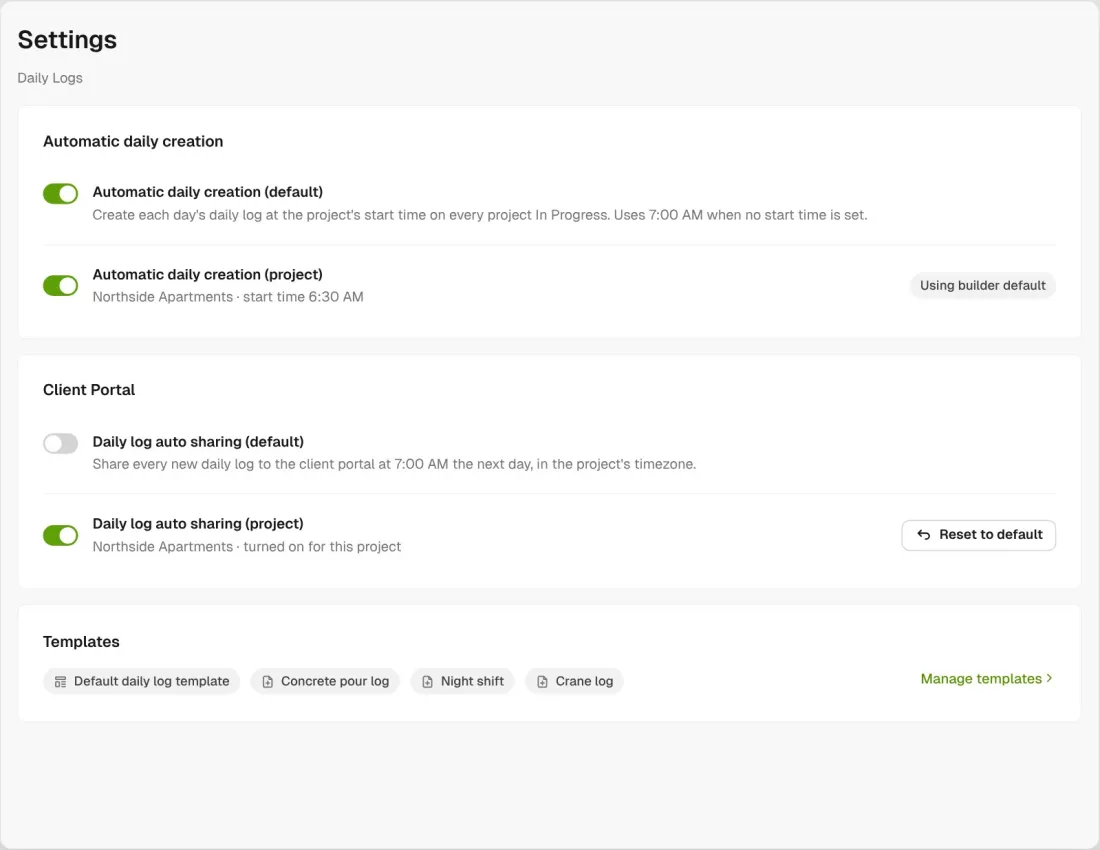
Site diary settings with automatic daily creation and daily log auto sharing, each with a builder default and a project override

Set it once

Turn on automatic daily creation and auto sharing for every project, then change either one project by project.

Connected to the whole job
BuildRun the site

Your daily logs, connected to the whole job

Attendance comes from your Sign Ons, photos come from punch items, forms and actions, and logs reach the owner through the Client Portal. Projects connected to Procore can push the day’s attendance across to Procore.

Explore site management
  1. Attendance fromSign Ons34 workers · 9 companies · 241.5 h
  2. Today’s logTue, Oct 20Concrete pour log · 6 photos
  3. CLIENT PORTALShared 7amWed, Oct 21 · Northside Apartments

Win

Price the job

Take off, estimate and get proposals out the door, without rekeying the same numbers three times.

Explore preconstruction

Pay

Manage the money

Budgets, commitments, pay applications and bills, so you see the real financial position of every job.

Explore finance

Connect

Connect the tools

Bring your other tools, your phone line and BuildPass AI into the same workflow.

Explore the AI toolkit

Trusted by builders who run their projects on BuildPass

From custom-home builders to commercial general contractors, teams across the United States run their projects on BuildPass every day.

Whether you're a local builder doing a handful of houses a year, or you're pushing for four or five digits, there's a solution here. And BuildPass can handle it.
Joel Patterson
Director of Construction, Burkentine Builders
It's a one-stop shop for construction safety. Everything you need is right there.
Jack Hensey
Business Operations Associate, Reidy Contracting Group
This is working much better with BuildPass. Much faster. Much cleaner.
David Guzman
Superintendent, Engen Contracting Inc.

Frequently asked questions

Not in the worker app. The daily log is for your superintendents and project managers, on a laptop, tablet or phone browser. If you want notes from the crew, set up a form they complete in the worker app.

Scan Notes turns a photo of handwritten notes into text. Improve, bullet points and Translate to English tidy what you’ve written. The daily log summary drafts a report over up to 93 days on In Progress projects. You accept or refine every result and nothing is sent on its own. An Owner or Account manager switches on AI tools in Settings, and it all works in the browser on a laptop or phone.

Only the ones you share. Share a log from its menu, or turn on auto sharing so each new log reaches the client portal at 7am the next day. The list shows which logs are shared.

Yes. Filter the list to the dates you need and choose Export all to PDF. The export runs in the background and the file arrives in your BuildPass inbox. You’ll find weather delay hours for any period in Reporting.

See how BuildPass works on your projects

Book a demo and we'll walk your team through it.