BuildPass Build

Quality assurance: Check the work and keep the proof

Superintendents and subs complete QA/QC inspections and checklists on their phone, with photos and signatures. A failed check raises a punch item on the spot, and Voice Punches fills in a new punch item from what you say.
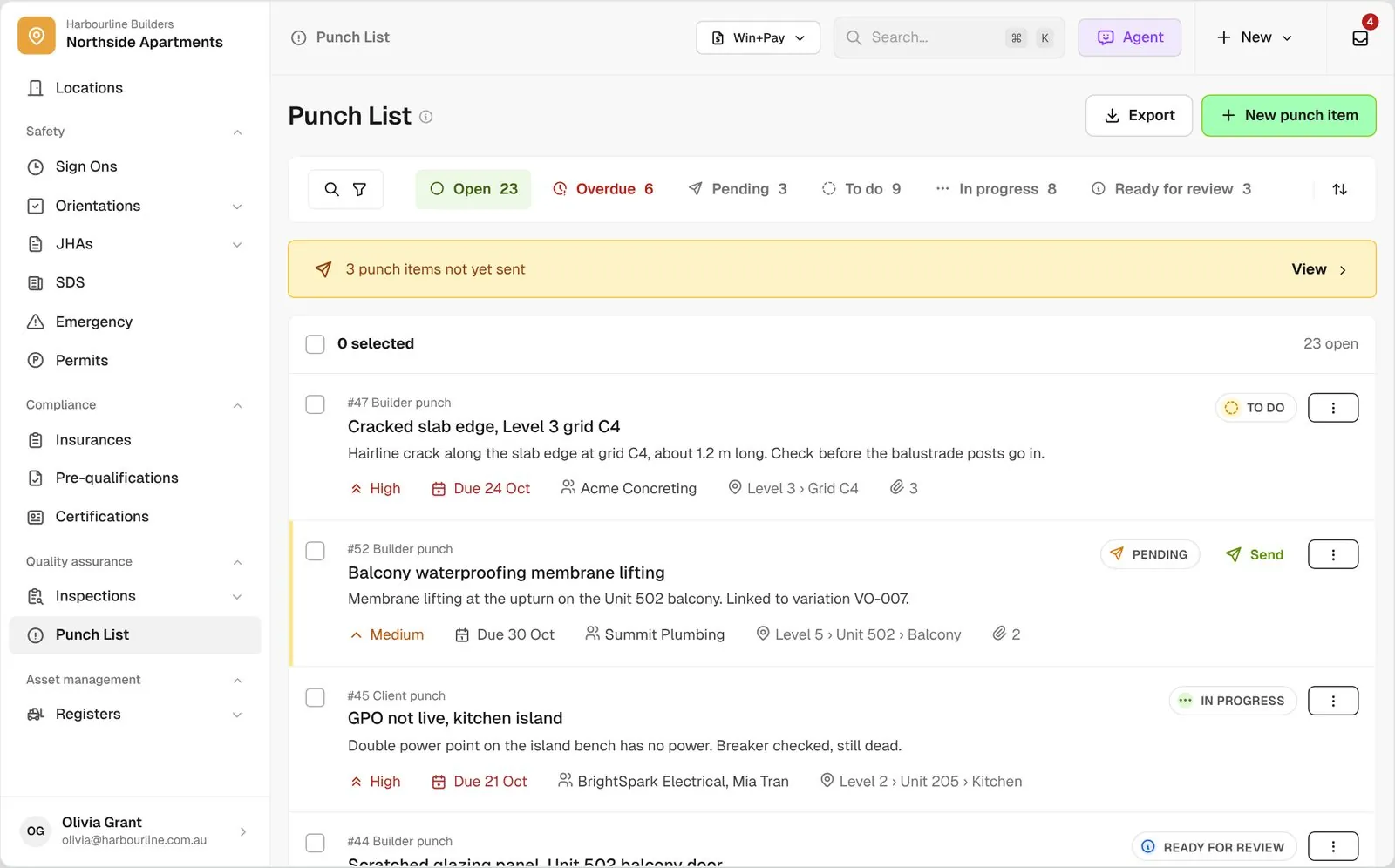
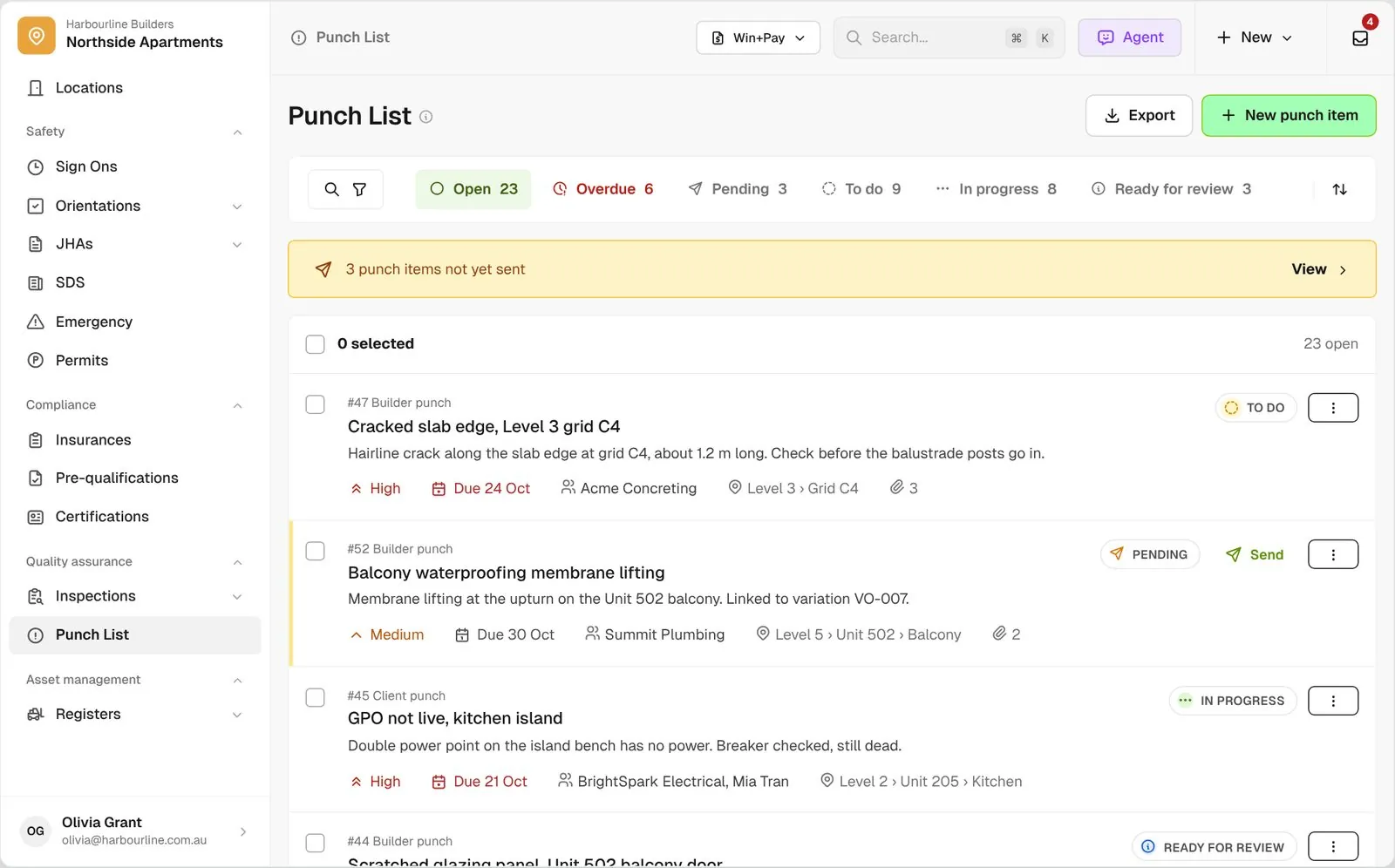
Defects list for Northside Apartments with Open, Overdue and Pending tabs, a 3 not yet sent banner, and rows showing status, priority, due date, assignee and location

Trusted by builders across the country

From custom-home contractors to commercial general contractors, field teams run their quality checks on BuildPass every day.


Reidy Contracting Group
Ameresco
DivisionOne Construction
Burkentine Builders
Ready Construction
DD Construction
Honest Hammer
Homestead
Copeland Construction
RMA Commercial General Contractors
Dryden Custom Homes
Reidy Contracting Group
Ameresco
DivisionOne Construction
Burkentine Builders
Ready Construction
DD Construction
Honest Hammer
Homestead
Copeland Construction
RMA Commercial General Contractors
Dryden Custom Homes
Reidy Contracting Group
Ameresco
DivisionOne Construction
Burkentine Builders
Ready Construction
DD Construction
Honest Hammer
Homestead
Copeland Construction
RMA Commercial General Contractors
Dryden Custom Homes
Reidy Contracting Group
Ameresco
DivisionOne Construction
Burkentine Builders
Ready Construction
DD Construction
Honest Hammer
Homestead
Copeland Construction
RMA Commercial General Contractors
Dryden Custom Homes
Fassberg
AJFX Construction
ECI Austin
New Age Builder
EDG Pro Contractors
Schwartz Custom Homes
ARK General Construction
Two Z Homes
Shade Doctor of El Paso
Fassberg
AJFX Construction
ECI Austin
New Age Builder
EDG Pro Contractors
Schwartz Custom Homes
ARK General Construction
Two Z Homes
Shade Doctor of El Paso
Fassberg
AJFX Construction
ECI Austin
New Age Builder
EDG Pro Contractors
Schwartz Custom Homes
ARK General Construction
Two Z Homes
Shade Doctor of El Paso
Fassberg
AJFX Construction
ECI Austin
New Age Builder
EDG Pro Contractors
Schwartz Custom Homes
ARK General Construction
Two Z Homes
Shade Doctor of El Paso

Construction quality software helps general contractors run QA/QC inspections in the field, log punch items with photos and locations, send them to the subcontractors responsible, and track each one until it is closed.

Quality shouldn’t depend on a clipboard and a follow-up text

Today the ITP is a printed sheet, the punch list is a spreadsheet and the fix gets chased by text. BuildPass keeps the check, the fix and the proof together.

Capture

Checked on the jobsite, not later

Inspections are filled in on the phone where the work is, with photos and signatures on the record.

Follow-up

Failed checks don’t get lost

A failed item becomes a punch item linked to the check it came from, assigned to the sub or trade that owns it.

Close out

Know what’s still open

See every open and overdue punch item, who has read it, and which fixes are waiting for your review.

How it works

Inspect it, fix it, then close it out

Three tools that hand work to each other. Open any one to see how it works.

Punch list

Logged, sent and closed

Log a punch item with a photo, location and due date, send it when you’re ready, and close it once the fix is back.

  • Punch list. Log punch items on the jobsite, send them to subs through a link they open without a login, and track each one until it’s closed. See Punch List
Defects list for Northside Apartments with Open, Overdue and Pending tabs and a not yet sent banner
Inspections

QA/QC checks done in the field

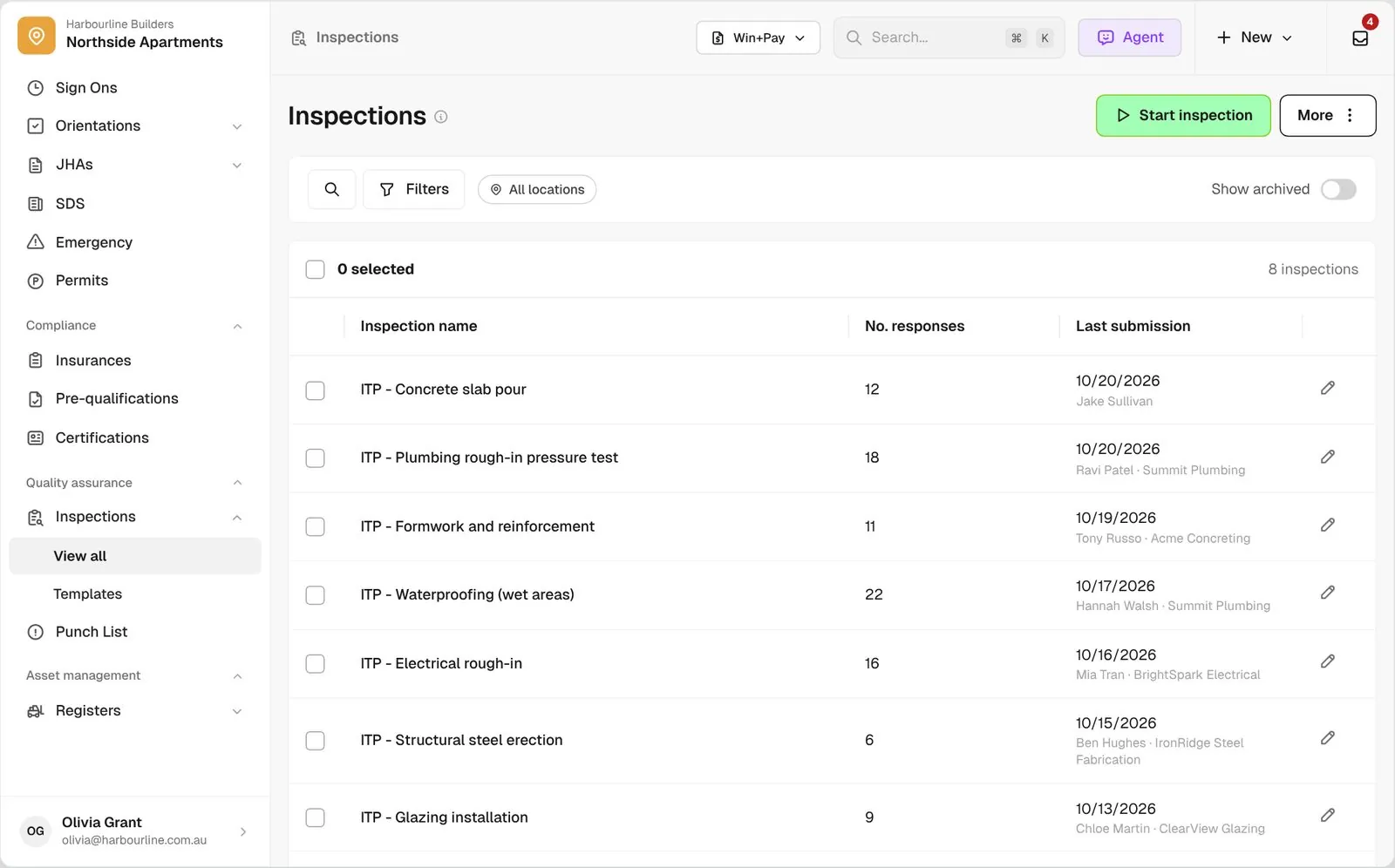
Build your inspection and test plans as templates with every check scored, so you see what passed and what didn’t.

  • Inspections (ITPs). Score each check as conforming or deficient, attach photos and signatures, and raise a punch item from any failed item. See Inspections (ITPs)
Inspections list for Northside Apartments with ITP templates, response counts and last submission
Checklists

Your own forms, on every project

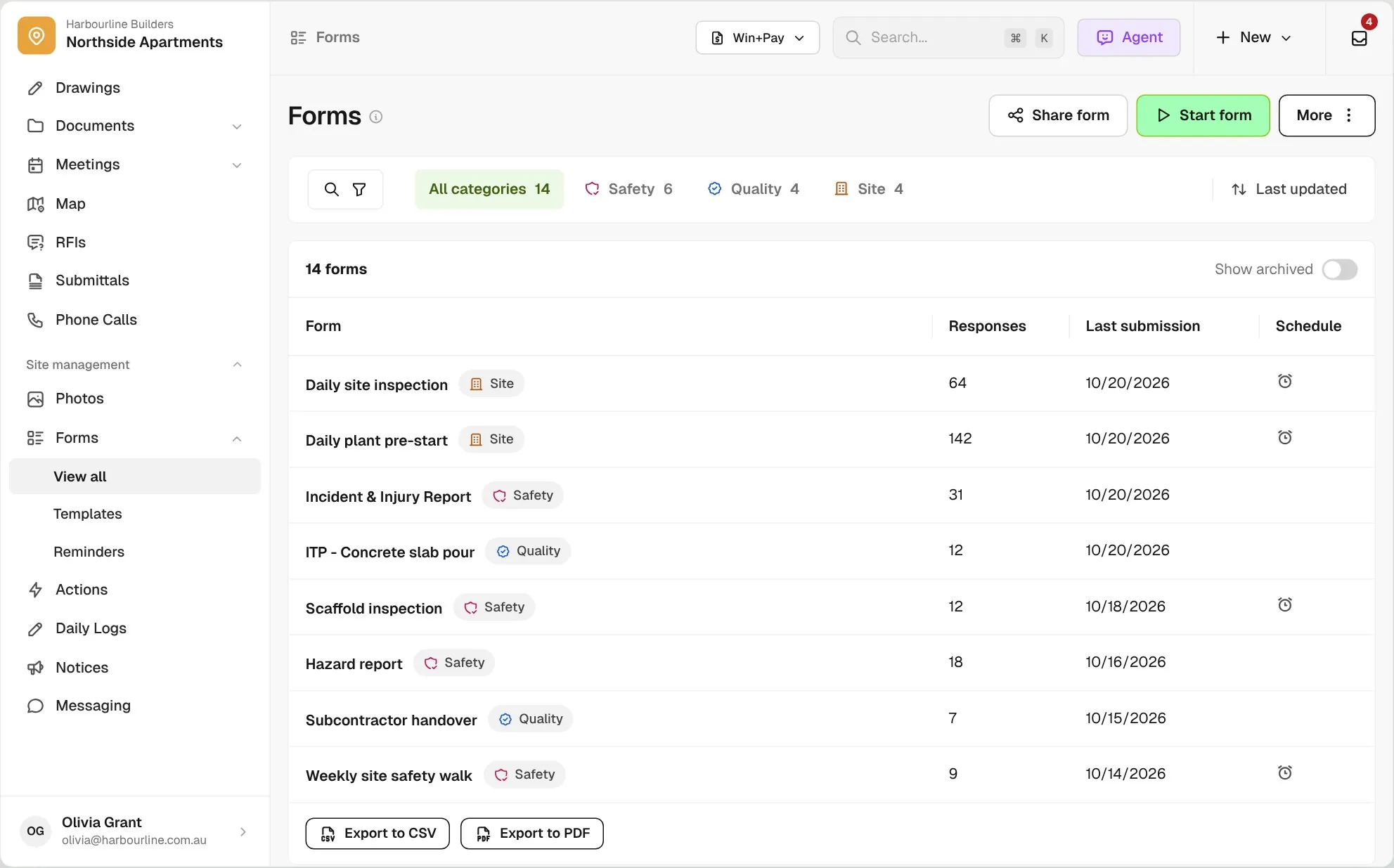
Turn paper checklists into forms, or start from one of the templates in the BuildPass library.

  • Checklists. Describe a check or upload the paper version and the Template Generator drafts the form. Choose which forms workers can start on their phone, set reminders for the admins who run them, and download any completed form as a PDF. See Forms
Form responses list with status tabs, form IDs and progress for each completed form
Every tool on one platform

Three tools, one record of the work

A failed item on an inspection or checklist becomes a punch item that stays linked to it. Punch items pin to the drawing they sit on, inspections link to a log item like a piece of equipment, and a workflow can email the PDF when one is done.

Connected with the rest of the platform

Quality assurance is just one part of BuildPass

Price the job in preconstruction, manage the money in finance and run the jobsite here, with the same companies, workers and documents on every project.

Trusted by builders who run their projects on BuildPass

From custom-home builders to commercial general contractors, teams across the United States run their projects on BuildPass every day.


Whether you're a local builder doing a handful of houses a year, or you're pushing for four or five digits, there's a solution here. And BuildPass can handle it.
Joel Patterson
Director of Construction, Burkentine Builders
It's a one-stop shop for construction safety. Everything you need is right there.
Jack Hensey
Business Operations Associate, Reidy Contracting Group
This is working much better with BuildPass. Much faster. Much cleaner.
David Guzman
Superintendent, Engen Contracting Inc.

Frequently asked questions

No. Send a punch item and the sub opens it from a link, updates it with a message and photos, and marks it ready for your review.

Not until you send it. A new punch item waits as pending so you can check it first, and a banner shows how many are still unsent. Once it’s sent, you see when each sub has read it.

No. A form is completed once, by one person. Add a signature block for sign off, and raise actions or punch items from any item that needs follow-up work.

Yes. Rebuild them as your own form templates, which are available on every project, or start from a BuildPass library template and make it yours.

See how BuildPass works on your projects

Book a demo and we'll walk your team through it.