Build

Safety data sheets reviewed, and on every worker’s phone

Safety data sheet (SDS) management software for construction sites

Ask subbies for the SDS before a product comes on site. Your safety manager reviews each sheet against your checklist, and reviewed sheets show up on the phone of every worker on the project.
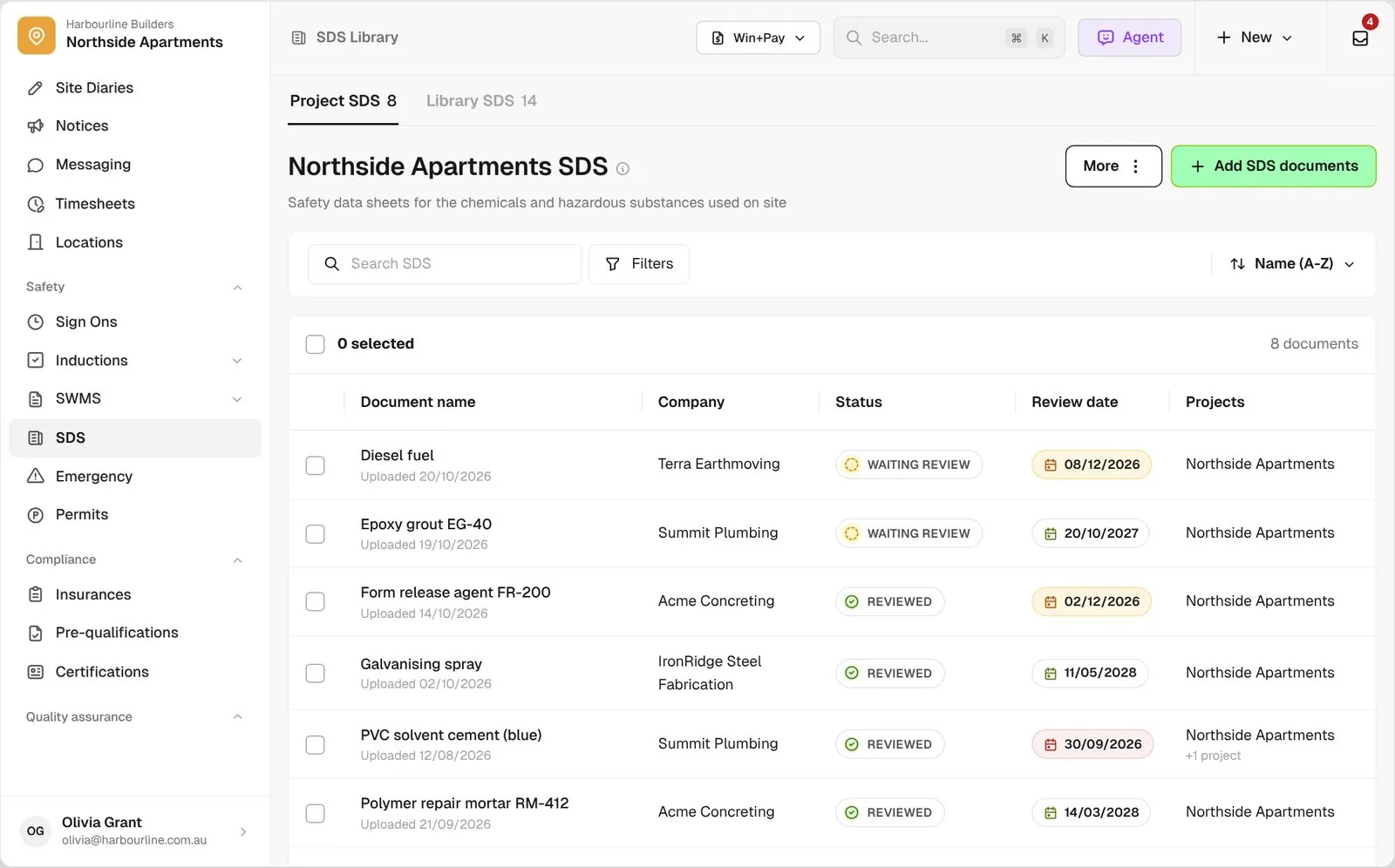
SDS Library for Northside Apartments with Reviewed, Waiting review and Changes requested sheets and their review dates

Trusted by builders across the country

From custom-home builders to commercial head contractors, site teams keep their safety data sheets on BuildPass.


Vaughan Constructions
Hicon
JCGAU
Turn Group
Saw Constructions
Rendine Group
Vaughan Constructions
Hicon
JCGAU
Turn Group
Saw Constructions
Rendine Group
Universal Constructions
McColl Smith Projects
Peach
Staark
Creador Interiors
ARC Projects
Mancini Made
Sense Projects
Universal Constructions
McColl Smith Projects
Peach
Staark
Creador Interiors
ARC Projects
Mancini Made
Sense Projects

SDS software helps builders and head contractors collect safety data sheets from subcontractors, review them against a checklist, track review dates and give workers on site the reviewed sheets on their phone.

One SDS process, from the subbie’s upload through to the worker’s phone

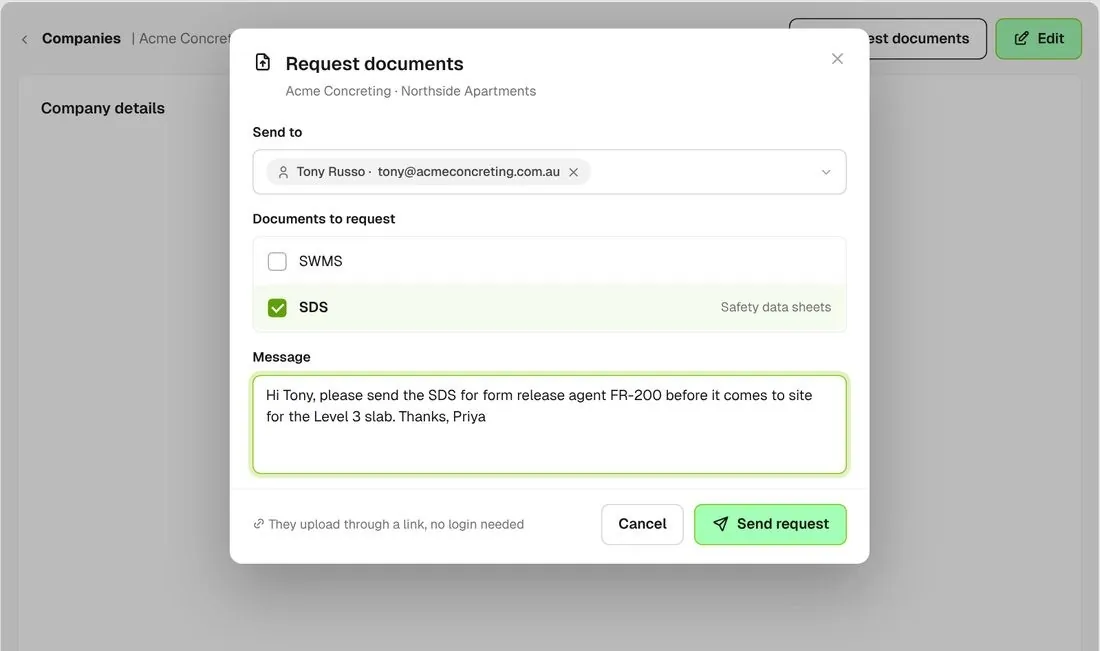
Company document request with SDS ticked and a message naming form release agent FR-200
01

Ask for the sheet

Tick SDS on a company’s document request and name the product in your message. They upload it through a link with no BuildPass login, before it comes on site.
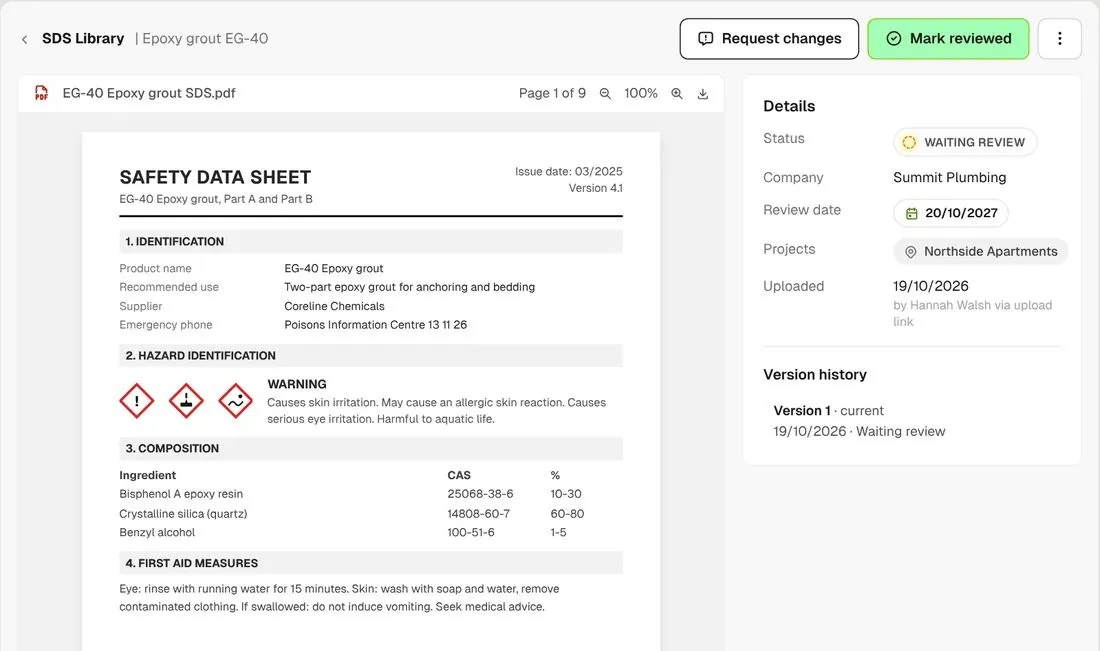
Epoxy grout SDS open in the viewer with Mark reviewed and Request changes buttons
02

Review it

Open the sheet, work through your SDS checklist, then mark it reviewed or request changes. Nothing reaches your workers until it is reviewed.
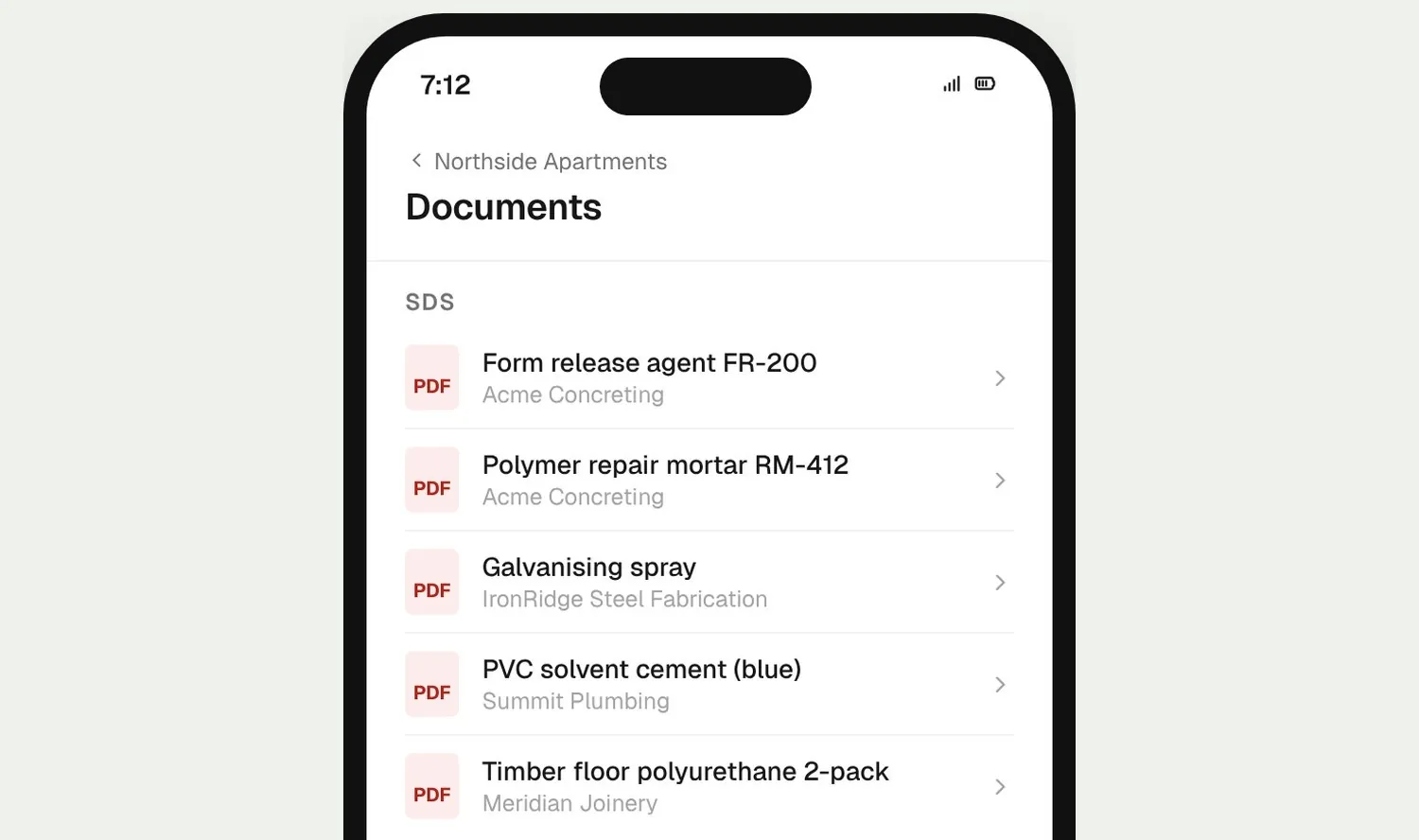
Worker phone showing the project documents with SDS listed above the SWMS
03

Workers open it on site

Reviewed sheets for the project sit above the SWMS in the worker app, so your crew can check first aid or storage on the spot.

How it works

Every SDS you hold, in one view

Upload in bulk, keep every version, and see which sheets are due for review across every project.
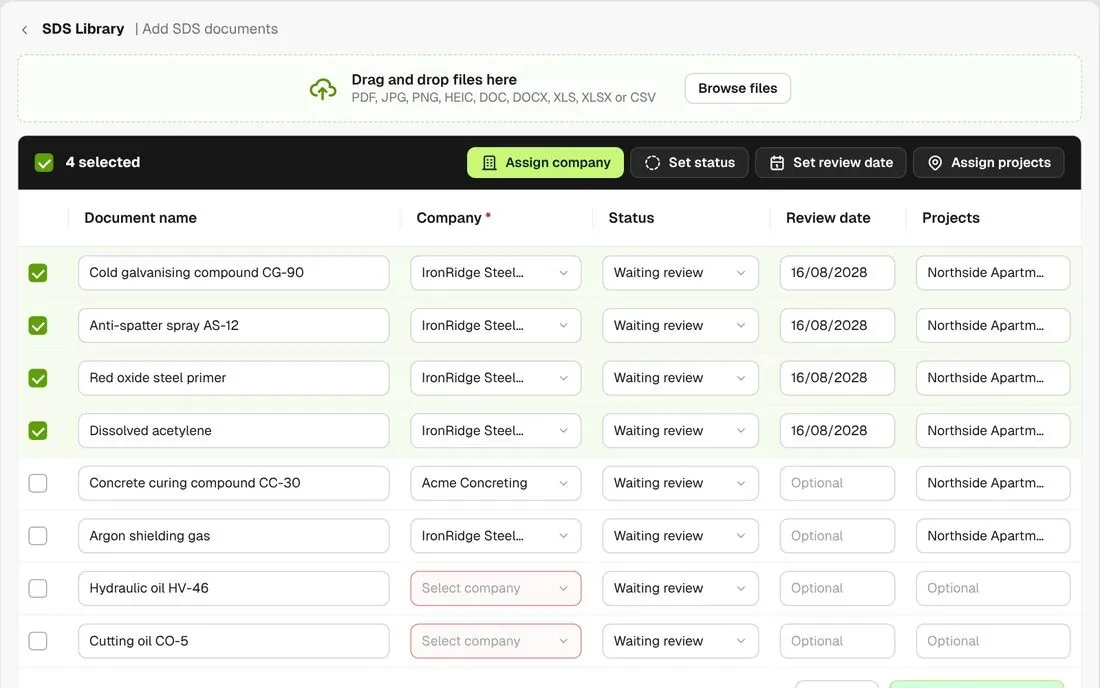
Add SDS documents screen with several file rows and bulk Assign company and Set review date controls

Upload a batch at once

Drop in a stack of sheets. Each file becomes a row, and you set the company, status, review date and projects for many rows in one go.
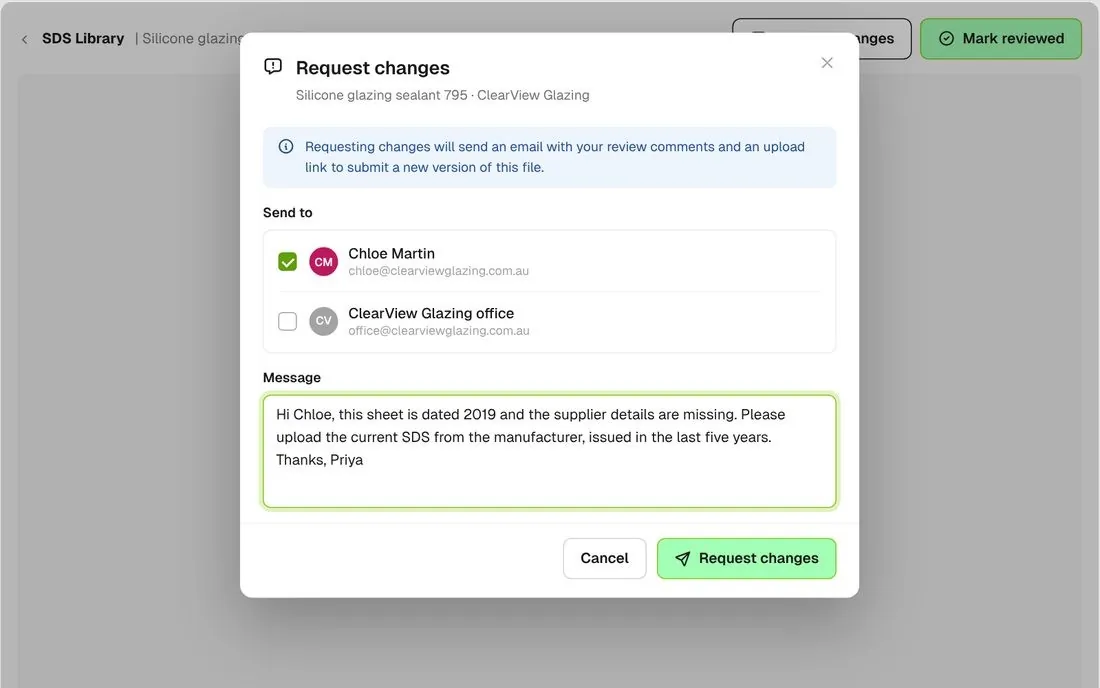
Request changes modal with company contacts and a message about an out-of-date sheet

Send it back with comments

Request changes and the company gets your comments by email, with an upload link for the new version.
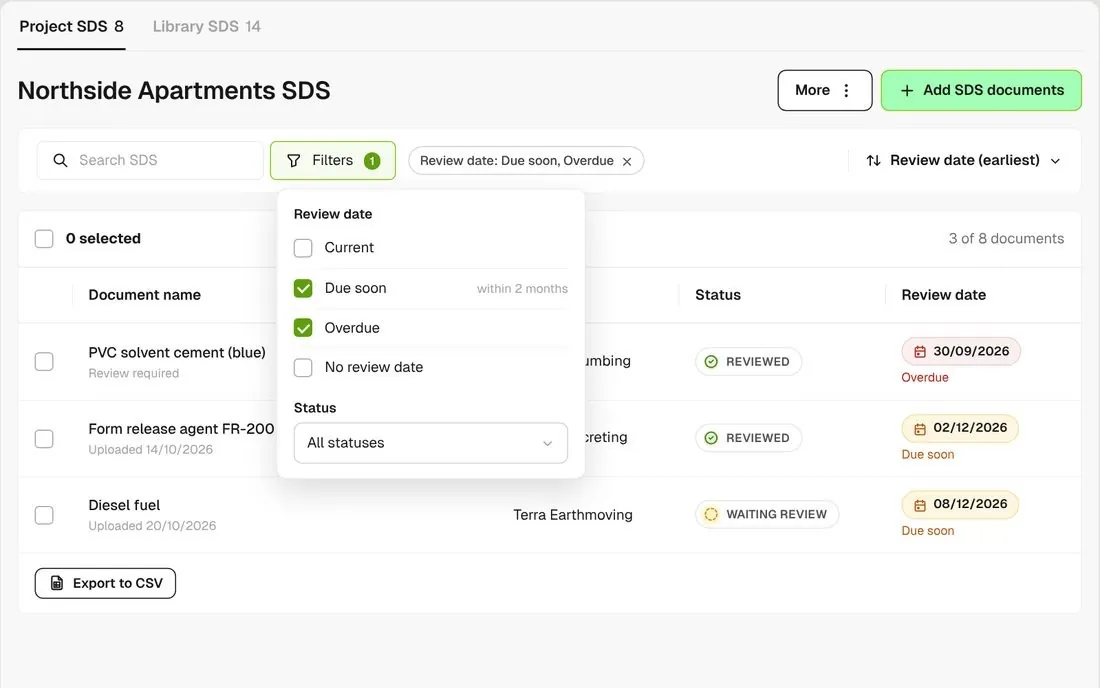
SDS list filtered to Due soon and Overdue review dates

See what is due for review

Give each sheet a review date. Filter to Due soon or Overdue to see which sheets need another look.
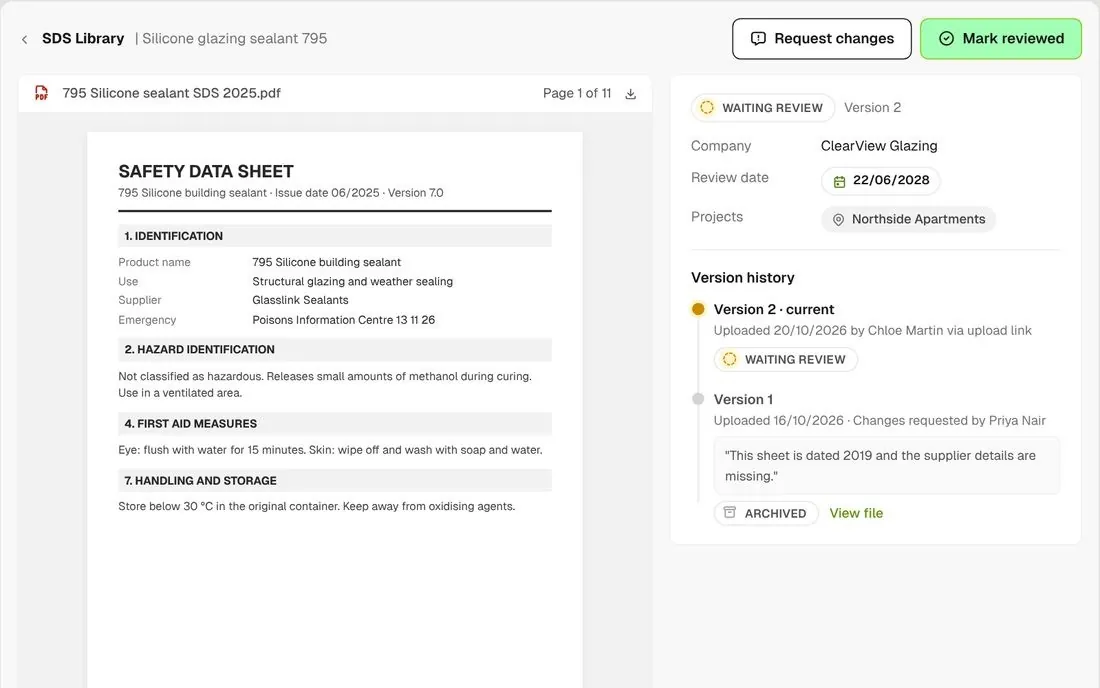
SDS detail showing the version history after a new version was uploaded

Every version kept

When the company uploads a new version, it is chained to the old one and the old one is archived. The version history keeps both.
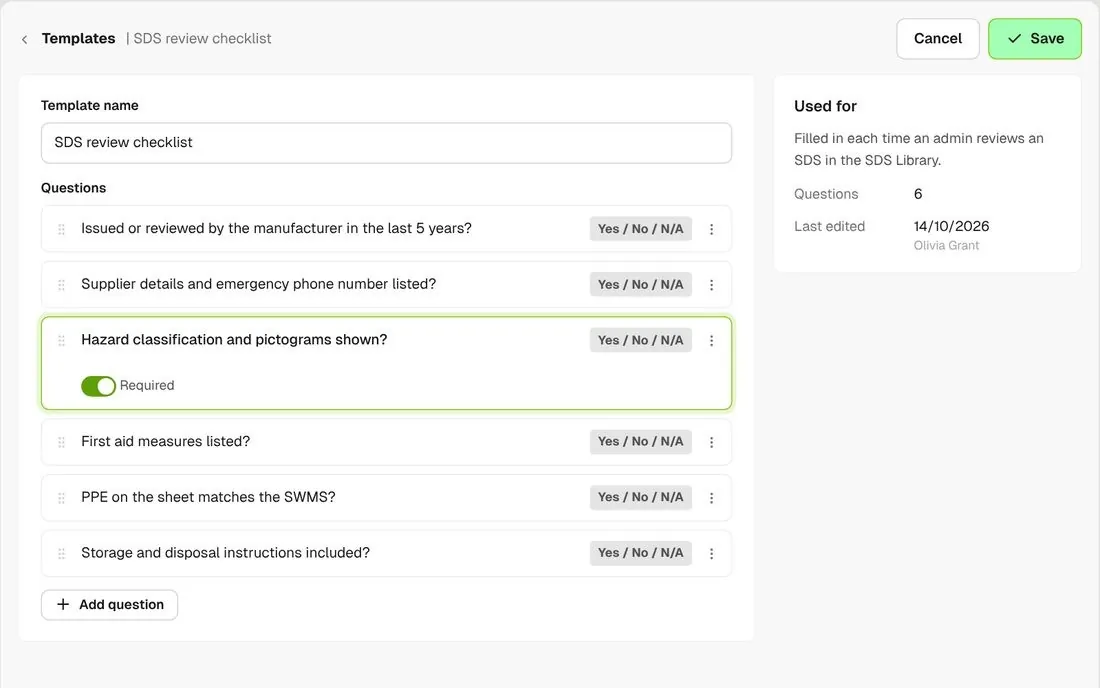
SDS review checklist template with six questions

Your own review checklist

The SDS review checklist is a template you edit. Set one default for every project, or connect a different checklist to a single project instead.
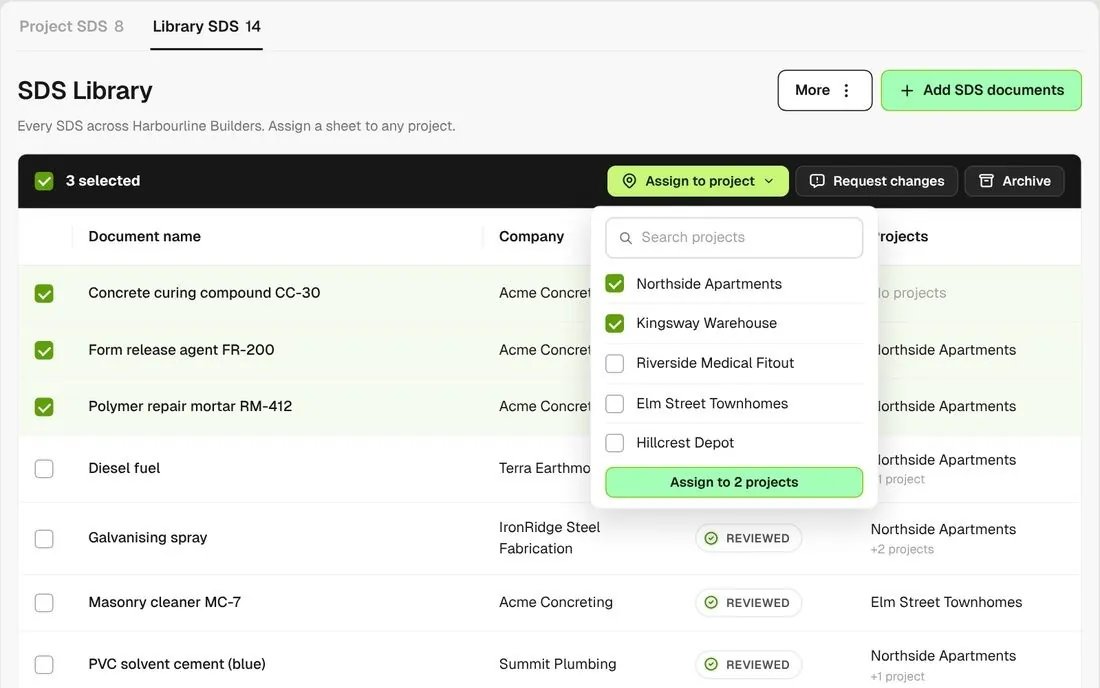
Library SDS tab with three sheets selected and Assign to project open

One library across projects

Keep sheets at account level on the Library SDS tab and assign them to any project, one sheet or many at a time.

Connected to the whole job
BuildRun the site

SDS, part of the whole job

SDS requests go out with the rest of a company’s documents, like SWMS and insurances. Reviewed sheets sit beside the SWMS in the worker app, and you can keep them hidden from a worker until their induction is reviewed.

Explore health and safety
  1. Document requestSDS + SWMS + insurancesone link per company
  2. ReviewReviewedyour SDS checklist, review date set
  3. ON THE WORKER’S PHONE5 reviewed sheetsForm release agent FR-200 · Acme Concreting, Northside Apartments, above the SWMS

Win

Price the job

Take off, estimate and get proposals out the door, without rekeying the same numbers three times.

Explore preconstruction

Pay

Manage the money

Budgets, commitments, progress claims and bills, so you see the real financial position of every job.

Explore finance

Connect

Connect the tools

Bring your other tools, your phone line and BuildPass AI into the same workflow.

Explore the AI toolkit

Trusted by builders who run their projects on BuildPass

From custom-home builders to commercial head contractors, teams across Australia and New Zealand run their projects on BuildPass every day.


The onboarding process and training we received from the BuildPass team was fantastic.
Nick Du Bois
Managing Director, FORA
These checklists ensure our standards are consistently met, no matter the project.
Mark Riley
Site Supervisor, Turn Group
I'd recommend BuildPass to any builder, sub contractor or site manager. It just makes your life easier.
Garath Vella
Director, Lorden Vella

Frequently asked questions

Yes. Workers see every reviewed SDS assigned to their project in the worker app. Sheets still waiting review, or not assigned to a project, do not show.

No. An SDS is a reference document, so there is no signature on it. If you need proof a worker has read a chemical instruction, put it in a Notice, a toolbox meeting or a SWMS.

Request changes on the sheet and the company uploads the new version through the link. It is chained to the old one, the old one is archived, and the new one waits for your review. Assign it to your projects, then mark it reviewed.

Not on its own. The SDS Library holds the sheets. To record chemicals with their quantities and locations, build a register in Registers and keep the SDS here as the reference.

See how BuildPass works on your projects

Book a demo and we'll walk your team through it.