
How to streamline construction workflows with software?
Learn how to streamline construction workflows with the right software. Reduce delays, automate approvals, and improve site efficiency with simple, field-ready systems.

Every construction company already has a workflow in place. The issue is that most of them have evolved organically over time, been shaped by habits, quick fixes, and a “that’s just how we’ve always done it” attitude.
On paper, the construction workflow process should move clearly from planning to execution and then through to closeout. But we all know that on site, this can look very different. Forms are shared by email, approvals sit in inboxes, site photos are stored in personal phones, and someone is left chasing signatures at the end of the week. This is a recipe for delays.
If you want to streamline construction workflows without adding complexity, the answer is better systems that reflect how construction actually works in the field.
Why construction workflows break down
Most workflows fail for simple reasons. They rely too heavily on people trying to keep track of 15 different things at once, communication is often siloed across multiple platforms, and manual entry is heavily relied on.
A project manager shouldn’t need to scroll through email threads to confirm an approval. A safety manager should not rely on spreadsheets to track compliance deadlines.
When these gaps exist, projects slow down, the possibility of encountering risks can increase and profit gets eaten up quickly. Teams often spend hours managing spreadsheets and searching for the right information across multiple systems. This is exactly where the right software can make a real, measurable difference.
How to streamline construction workflows
“Streamlining” doesn’t mean adding a complicated platform that nobody uses. In fact, we see it all the time, systems don’t fail because the technology is bad, they fail because the team never uses it.
Here’s what actually works.
1. Standardize processes across every site
If every project handles safety, reporting, and approvals differently, that’s where mistakes can happen. Standardizing is key.
Start by identifying repeatable processes:
- Incident reporting
- Equipment maintenance logs
- Toolbox talk confirmations
- Inspection sign-offs
- Subcontractor onboarding
Document them once, then digitize them. When every site runs the same construction workflow process, you reduce the risk of mistakes instantly.
2. Automate the follow-up
Manual follow-up can be a real time-suck. This is where strong construction process workflow management software makes a real difference.
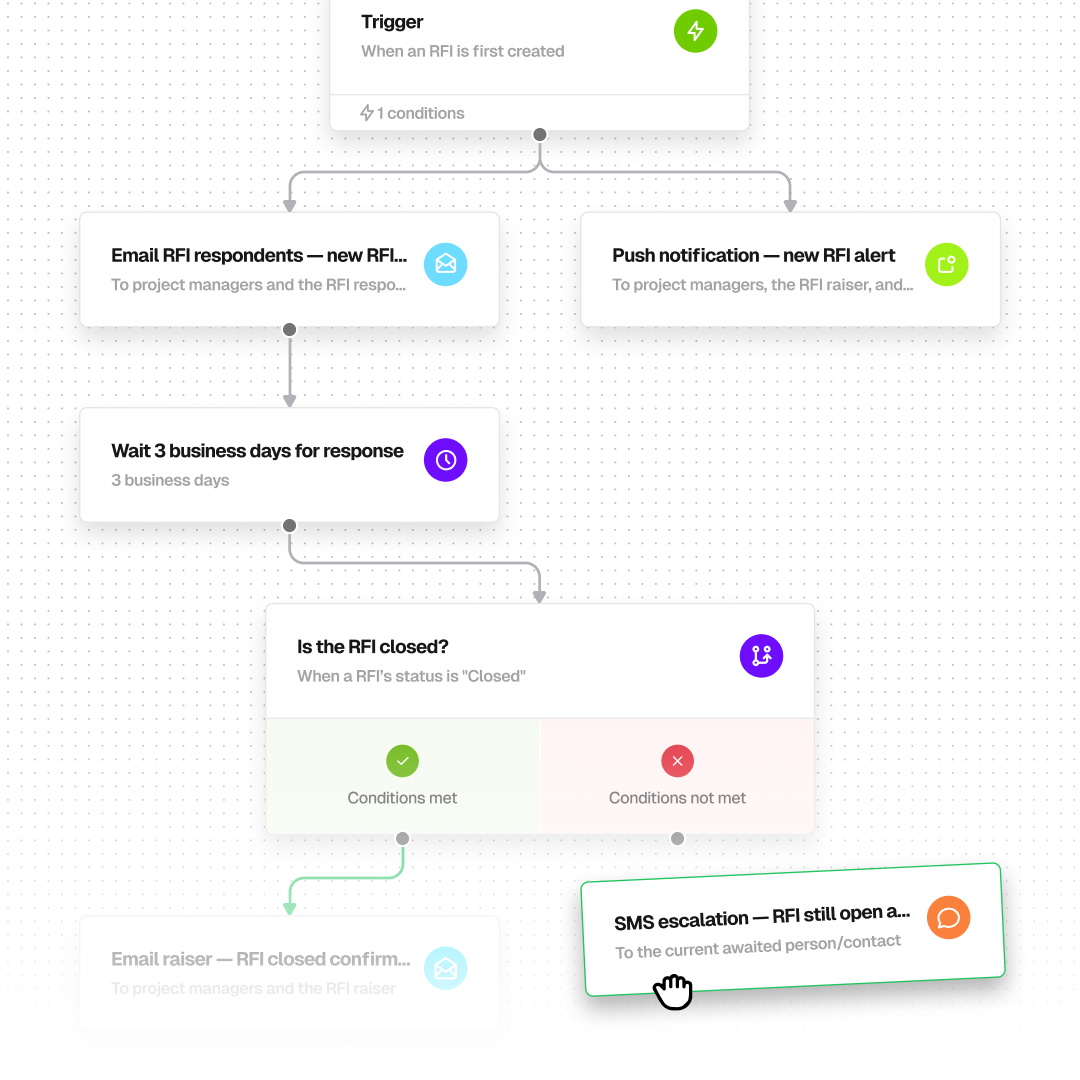
Construction process workflow management software removes friction by automating the steps that don’t need a human. Instead of relying on memory and manual outreach, the system can automatically trigger:
- Reminders for incomplete forms
- Escalations based on risk level
- Approval requests
- Notifications to specific roles
Instead of sending five separate WhatsApp messages to confirm a safety acknowledgment, the system handles it automatically.
3. Use conditional logic to reduce clutter
A construction workflow process should reflect the reality of the job site. Not every issue deserves the same response.
Consider injury reporting. A minor cut should not trigger the same escalation path as a serious site incident. With conditional branch logic, the workflow adjusts automatically based on the information submitted.
In BuildPass, workflows are triggered by form submissions. For example, when someone submits an incident report form, the workflow begins automatically. From there, conditional logic determines what happens next based on the answers provided in that form.
Another example is a site inspection form. If a worker marks that scaffolding is unstable, a follow-up question asking for photos or a description of the issue can appear automatically, while irrelevant questions stay hidden. This keeps forms clear, and makes sure that only relevant information is captured, and triggers the right workflow steps.
This is what effective construction process workflow management looks like. It gives you structure without ignoring the nuance.
4. Keep it field-first
Even the best construction workflow process will fail if the field team doesn’t use it. Adoption is always the deciding factor for success.
If a workflow takes too long to complete or feels overly admin-heavy, crews will always default back to texts, phone calls, or paper forms. That defeats the purpose of streamlining construction workflows in the first place.
Strong construction process workflow management tools are:
- Mobile-friendly
- Fast to complete
- Clear and intuitive
- Designed to save time, not add to it
The experience should feel natural and easy for superintendents, foremen, and subcontractors.
And it’s not just about using workflows in the field, it’s about setting them up quickly, too. BuildPass is launching an AI template prompter, so those on-site can generate workflow templates, instead of building them from scratch. It removes the manual headaches and makes it easier to roll out consistent processes across every project.
How BuildPass can streamline construction workflows
If you’re serious about streamlining your construction workflow process, BuildPass is built specifically for the way real job sites operate. You can customize your construction process workflow management with features that make life easier on site:
- Drag-and-drop builder: Quickly map out your workflow process with an intuitive and simple drag-and-drop interface, letting you add specific actions, conditions, and steps.
- Conditional branch logic: Split your workflow into different branches based on task responses, team roles, or project conditions.
- Automated alerts and notifications: Improve communication ten-fold with automatic SMS, email and push notifications for approvals, escalations and task reminders.
- Conditional wait steps: Pause tasks until a form is updated or a condition is met.
- Complete audit trail: Maintain a full run history for every workflow, giving managers full visibility.
- Templates or AI promoter to help build your workflows without starting from scratch
If you want construction management software that can truly streamline your construction workflows, BuildPass is ready and waiting. Book a demo and see for yourself.
More news you'll care about
Don't stop there, the BuildPass blog is filled with interesting insights and innovations that'll help you and your construction business stay ahead of the pack.