
Best JSA Software for Construction
Compare the best JSA software for construction. Build, review, and sign Job Safety Analyses on mobile, with templates and real-time approvals.

Every high-risk task on a construction site starts with the same question. Have we identified the hazards and put controls in place? That's what a Job Safety Analysis (JSA) is for, and the way most teams handle them is still the bottleneck.
Paper JSAs get lost. PDF JSAs get emailed and never reviewed. Templates get copied between projects without the hazards being updated. Then a near-miss happens, and the question becomes "where's the paperwork?"
Construction JSA software fixes the workflow. Below is what it does, what to look for, and how the right tool changes the day-to-day for site managers, superintendents, and safety officers.
What is a JSA, and what does JSA software do?
A Job Safety Analysis breaks a task into steps, identifies the hazards at each step, and lists the controls that bring the risk down to an acceptable level. It's the planning document that proves a high-risk task has been thought through before it starts.
JSA software digitizes that workflow. Instead of paper or a shared drive, you get:
- A template library you can customize for each task and site
- An interactive builder that walks crews through hazards and controls
- Digital signatures from supervisors and workers
- A review checklist that flags missing controls before sign-off
- A central record of every JSA across every project
- Notifications so reviewers know when something's waiting on them
When a JSA lives in software instead of on paper, it actually gets reviewed, signed, and acted on. That's the difference.
JSA vs JHA: what's the difference
Both terms describe the same idea. Break a task down, find the hazards, control them. OSHA's official term is JHA (Job Hazard Analysis), but JSA (Job Safety Analysis) is more common across US construction sites. Some firms use them interchangeably. Others use JHA for OSHA-aligned documentation and JSA for crew-level briefings.
For practical purposes, treat them as the same workflow. Good JSA software supports both labels.
Features to look for in construction JSA software
Not every safety platform is built for construction. When you're comparing options, the features below separate tools that work on site from tools that look good in a sales demo.
| Feature | Why it matters |
|---|---|
| Mobile builder | Crews fill out JSAs on a phone or tablet, not at a desk |
| Template library | Pre-built JSAs for common construction tasks, customizable by site |
| Review checklist | Flags missing hazards or controls before submission |
| Approval workflow | Superintendent or safety officer signs off before work starts |
| Subcontractor access | Subs can upload and submit their own JSAs |
| Digital signatures | Workers sign a JSA before they pick up the tool |
| Notifications | Reviewers get pinged when a JSA is waiting on them |
| Central storage | Every JSA stored by project, searchable, audit-ready |
| Linked to orientations | Workers can't sign on without a current JSA on file |
If the tool you're looking at is missing half of these, it's probably built for a desk job, not a site.
How BuildPass handles JSA management for construction teams
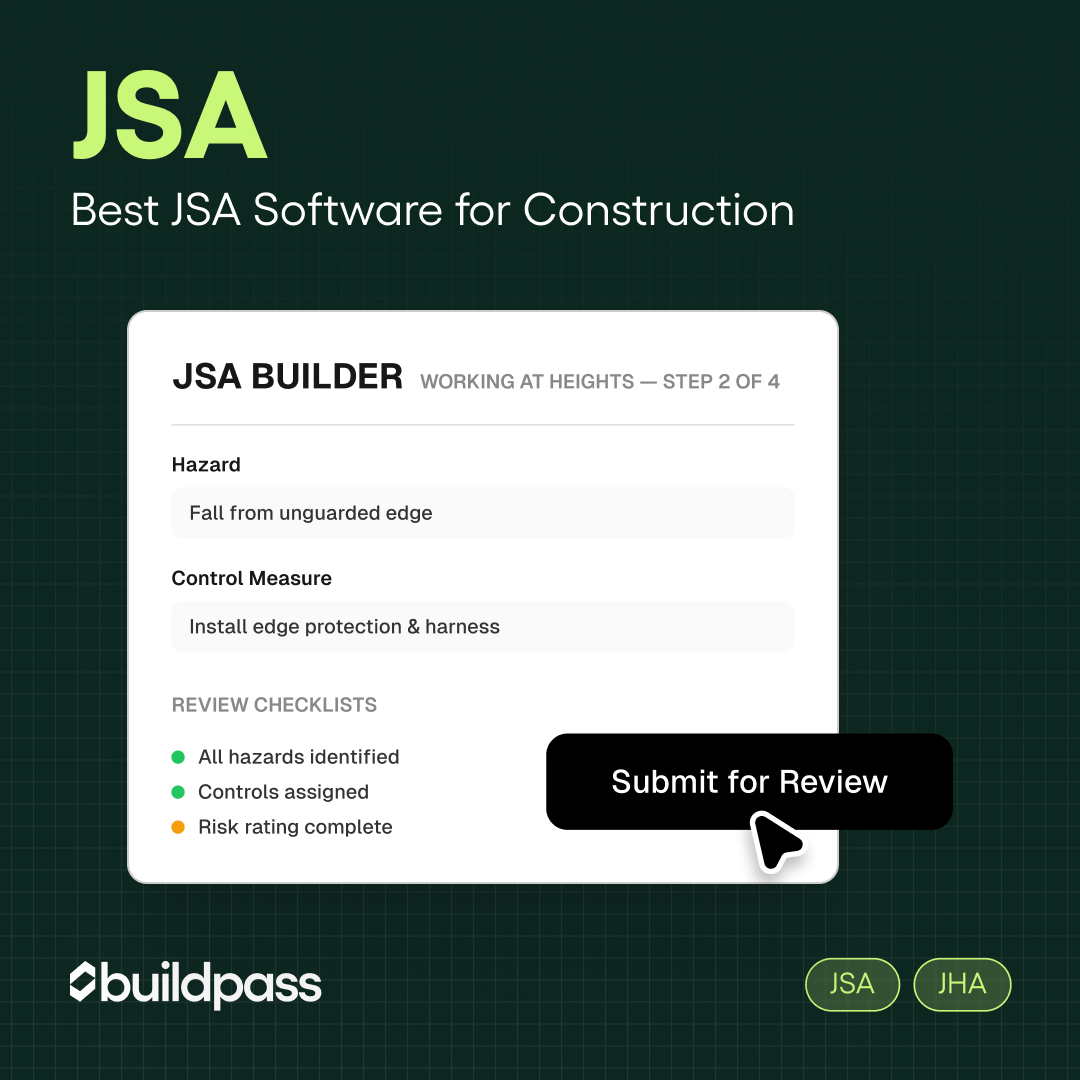
The BuildPass JSA Builder walks crews through a structured creation process. You start from a template, customize it for the specific task, and a review checklist on the right-hand side flags any missing controls. Once submitted, a notification goes to the superintendent for review. Once approved, workers digitally sign the JSA before starting work.
Subcontractors upload their own JSAs through the app. The system requests them before subs arrive on site, which means you're not chasing paperwork at the gate. Every JSA is stored against the project, tied to the worker who signed it, and ready for audit.
Crews spend less time on paperwork and more time on the work.
Is JSA software worth it for smaller construction companies?
Short answer: yes, especially if you have more than one project running.
Even small contractors face the same problems as larger firms. Subs without current JSAs, templates that get copied without being updated, near-misses that should have been caught in a hazard review. The difference for a small team is that one missed JSA can become a real incident faster, because there isn't a full safety team behind you to catch it.
Most JSA software now offers pricing that scales with project size, so cost isn't the obstacle it used to be. The bigger question is whether your team will actually use it, which comes back to mobile-first design and a builder that doesn't add steps.
How to roll out JSA software on your sites
If you're switching from paper or PDFs, keep the rollout simple.
- Pick three high-risk tasks common to your projects (working at heights, hot work, confined space are good starting points). Build templates for these first.
- Pilot on one site. Run the platform on a single project before rolling it out wider.
- Make it part of orientation. Workers learn the JSA flow during their site orientation.
- Tie it to high-risk permits. No JSA, no permit, no work.
- Review the data. After 30 days, check completion rates, average review times, and any gaps.
Most teams hit normal usage inside two weeks. The teams that don't are usually the ones who tried to roll it out everywhere at once.
Frequently asked questions
What is JSA software and how does it work on a construction site?
JSA software is a digital tool that lets crews create, review, and sign Job Safety Analyses on a phone or tablet. It uses templates, an interactive builder, and an approval workflow so high-risk tasks are reviewed before work starts. Every JSA is stored in one place, signed digitally, and ready for audit.
What's the difference between JSA software and JHA software?
There isn't a meaningful difference. JSA (Job Safety Analysis) and JHA (Job Hazard Analysis) describe the same workflow. OSHA uses JHA. Most US construction sites use JSA. Good software supports both terms.
How does BuildPass handle JSA management for construction teams?
BuildPass gives you an interactive JSA Builder with templates, a built-in review checklist, an approval workflow, and digital signatures. Subcontractors can upload their own JSAs through the app, and every document is stored against the project for audit. Workers can't start high-risk work without an approved JSA on file.
What should I look for in JSA software for construction?
Look for mobile-first design, a template library aligned to construction tasks, a review checklist that flags missing controls, an approval workflow, subcontractor upload access, digital signatures, and central storage that's audit-ready. If a tool is missing those, it's not built for construction.
Is JSA software worth it for smaller construction companies?
Yes. Smaller contractors face the same compliance and safety pressures, often with less internal support. JSA software cuts time spent chasing paperwork, makes hazard reviews consistent, and keeps records audit-ready. Pricing now scales with project size, so cost rarely justifies sticking with paper.
Book a demo today.
More news you'll care about
Don't stop there, the BuildPass blog is filled with interesting insights and innovations that'll help you and your construction business stay ahead of the pack.