Best construction management software for growing builders
Running 5-15 projects and outgrowing spreadsheets? Here are the tools built for GCs at your stage, and how to pick the right one.

If you're managing a few projects, spreadsheets, emails, and shared folders may still work. As your project count grows, keeping information organised across teams becomes much harder. The best construction management software for growing builders should improve everyday workflows like communication, documentation, safety, and project tracking without creating unnecessary complexity. Growing builders don't always need enterprise-level software. They need tools that their office teams and site crews will actually use. Before choosing a platform, focus on adoption, ease of setup, construction-specific features, and whether it solves the problems your team is facing today.
There's usually a point where the systems that helped you grow start becoming the things slowing you down. A shared drive, spreadsheets, emails, and group chats can work well when you're managing a small number of projects. But as you take on more jobs, more subcontractors, and more moving parts, keeping everyone aligned becomes harder.
Updates get missed. Documents become difficult to find. Site teams spend more time chasing information than getting work done. This is usually when builders start looking for construction management software.
The challenge is finding a platform that matches where your business is now. Some tools are designed for smaller teams and focus on simplicity. Others are built for large contractors with dedicated systems teams and complex implementation processes.
For growing builders managing multiple projects, the best construction project management software is the one that improves daily operations without adding another layer of admin.
What "growing builder" actually means (and why it matters for choosing the right software)
A growing builder is usually past the point where spreadsheets, emails, and shared folders can keep projects running smoothly, but not yet at the stage where a large enterprise platform makes sense.
For many GCs, this happens when they are managing multiple active projects at once. The challenge is no longer keeping track of one job. It's making sure the right information reaches the right people across several sites, without relying on one person remembering everything.
At this stage, the problems are often familiar:
- Safety documents and compliance records are spread across different systems
- Subcontractors arrive on site without completing required orientations
- Project updates get buried in email threads and group messages
- Punch lists, tasks, and follow-ups become harder to track across multiple jobs
- Office teams and site teams don't always have the same visibility
Large enterprise construction platforms can provide extensive functionality, but they often require significant setup, training, and ongoing administration. For a growing builder, the priority is usually a system that can be implemented quickly, works for both office teams and field crews, and improves the processes that happen every day on site.
What to look for in construction software at this stage
Before you look at any specific product, get clear on what you actually need from a contractor project management software platform at your stage.
- End-to-end operations, from preconstruction through to project completion. At this stage, growing contractors need more than individual tools for isolated tasks. Managing estimating, preconstruction, project delivery, documentation, and financial workflows across separate systems creates more places for information to get lost. Look for a platform that supports the full project lifecycle, helping teams stay connected from winning the work through to managing day-to-day operations on site.
- OSHA compliance tracking built in, not bolted on. Expiring certifications, JHAs, permits. These need to be visible without someone doing a manual audit. If the compliance module feels like an afterthought, it probably is.
- Scheduling with critical path visibility. At ten or more concurrent projects, you need to know which tasks actually control the end date, not just a list of what is due this week.
- Works on-site on any device. If it only runs well at a desk, your super will not use it. Cloud-based construction management software that works on a phone on site is not optional at this stage.
- Live on a real project in days. A six-month implementation timeline is a Tier 1 problem. You need to be running the tool on an active project quickly, with minimal setup overhead.
- Does not require a full-time admin to maintain it. The best construction management software for small business contexts runs without a dedicated system manager. If keeping it accurate requires constant manual upkeep, it will be abandoned within a month.
The tools worth considering
There isn't one "best" construction management platform for every builder. The right choice depends on the type of work you do, how many projects you're managing, and where your current processes are starting to break down.
Some platforms are designed for large commercial contractors with complex workflows and dedicated teams managing the system. Others focus on helping smaller and growing builders organise everyday operations without adding unnecessary complexity.
Here are some of the platforms GCs commonly consider and where they tend to fit.
BuildPass
BuildPass is designed for growing GCs who need a simpler way to manage day-to-day site operations across multiple projects. The platform brings key construction workflows into one place, including worker orientations, daily logs, safety documentation, forms, scheduling, document management, and project closeout. Beyond project delivery, BuildPass also supports pre-construction and finance workflows, helping contractors manage everything from estimating and procurement through to job costing, invoices, and project performance.
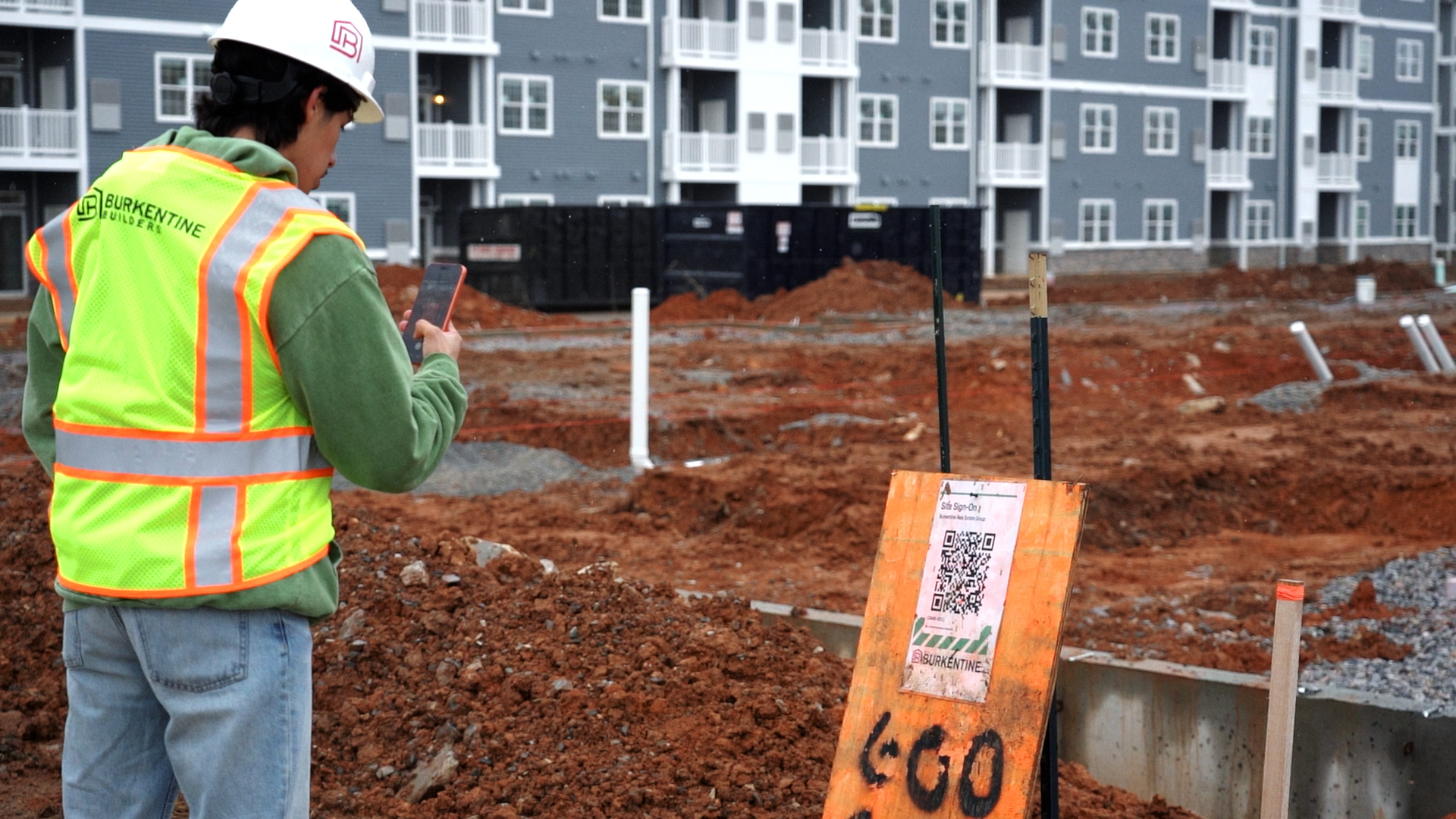
For site teams, the focus is making everyday tasks easy to complete. Workers and subcontractors can scan a QR code to complete an orientation, provide required information, and sign in without needing lengthy setup or training. For growing contractors, this helps reduce the manual follow-up involved in chasing documents, tracking compliance records, and keeping project teams aligned.
Procore
Procore is one of the most established construction management platforms in the US and is widely used by large commercial contractors and enterprise GCs. Its strength is the breadth of tools available, covering areas such as project management, financials, quality, safety, and reporting. For growing GCs, the main consideration is whether that level of functionality matches the needs of the business today. Enterprise platforms often require more implementation time, internal ownership, and ongoing administration, so it's important to consider whether your team has the resources to get full value from the system.
Buildertrend
Buildertrend is primarily designed for residential builders, remodelers, and custom home builders. It provides tools for areas such as scheduling, customer communication, budgeting, selections, and project management, making it a common choice for residential contractors looking to move away from spreadsheets and disconnected systems.
The key consideration is whether the platform supports the full range of workflows your projects require, particularly around field operations, safety documentation, and compliance tracking.
Fieldwire
Fieldwire is primarily focused on field coordination, drawings, task management, and punch lists. It can be a strong option for teams looking to improve communication around site tasks, plan markups, and closeout. However, contractors looking for a complete construction management platform may need additional tools alongside it for areas such as safety documentation, orientations, scheduling, and reporting.
What happens when you pick the wrong tool
The biggest mistake growing contractors make is choosing software that doesn't match how their business operates.
A platform can have all the features you need on paper, but if it takes too much effort for your team to use day to day, it won't deliver much value. Office teams may complete the setup, but if supers and subcontractors find the process too complicated, they'll often fall back on the tools they already know: texts, emails, and spreadsheets.
The opposite problem can happen too. A tool that works well for a small contractor may not provide enough visibility as you take on more projects. Tracking documents, safety requirements, subcontractor information, and project updates becomes harder when everything is managed separately.
Using multiple disconnected tools can create the same issue. A scheduling platform, safety system, and document storage tool may each solve one problem, but if they don't work together, your team spends more time updating systems and chasing information.
The right construction management software should make your existing processes easier to manage, not add another layer of work.
How to trial a platform without wasting a month on it
The best way to evaluate construction management software is to test it in a live project.
A demo can show you what a platform does, but it won't tell you whether your team will use it day to day. Before committing, trial it with your actual workflows and people. Here is a practical approach:
1. Start with one active project
Avoid testing with a sample project or empty account. Choose a current job that reflects the type of work you do and see how the platform handles real communication, documentation, safety processes, and daily site operations.
2. Get your field team involved early
The people using the platform in the field should be part of the decision. Ask your superintendent or foreman to use it as part of their normal workflow. If it saves time and makes daily tasks easier, adoption is much more likely.
3. Test the subcontractor experience
Your internal team might understand the platform, but subcontractors need to be able to use it without unnecessary steps. Test how easy it is for a new worker to complete an orientation, provide required documentation, and access job information.
4. Check whether it reduces admin
After a week or two, look at what has changed. Are you spending less time chasing documents, following up with subcontractors, and searching through emails or spreadsheets? The right platform should reduce admin work, not create another layer of it.
5. Review what information you can access quickly
A good construction management system should give you better visibility across your projects. Check whether you can quickly find important information like completed orientations, worker records, safety documentation, daily logs, and project updates.
6. Make a decision based on real usage
Don't let a trial run indefinitely. A couple of weeks using the platform on a real project should give you a clear idea of whether it fits your team, your jobs, and the way you operate.
If you want to see what BuildPass looks like for a GC at your stage, book a demo and we will walk through a live project with you.
Frequently asked questions
What size construction company actually needs project management software?
There's no exact number, but many contractors start looking for construction project management software when they are managing multiple active jobs and information starts becoming harder to keep track of. As the number of jobs, subcontractors, and site teams grows, it becomes harder to keep everyone working from the same information. This is usually the point where a dedicated construction management platform starts to add value by helping teams manage documents, safety processes, communication, and daily operations in one place.
What is the difference between construction management software built for small builders versus enterprise platforms?
The biggest difference is usually complexity. Enterprise platforms are designed for larger contractors managing complex projects, multiple teams, and detailed reporting requirements. They can offer extensive customization, but they often require more setup, training, and ongoing management. Software designed for growing contractors focuses on making everyday tasks easier to manage. The goal is to give teams visibility across projects while keeping workflows simple enough that both office teams and field crews will actually use the system.
Which construction software features matter most when you are scaling from 5 to 15 projects?
At this stage, the most valuable features are usually the ones that help your team stay organised as project volume increases. Look for tools that help with:
- Managing daily logs and project updates
- Keeping safety documentation organised
- Tracking worker information and certifications
- Managing tasks, punch lists, and follow-ups
- Giving office teams visibility into what is happening in the field
How long does it take to get construction management software up and running on a live project?
It depends on the platform and how much configuration is required. Some enterprise systems can take weeks or months to fully implement, particularly if they require extensive customization. For growing contractors, a platform that can be introduced quickly and tested on a live project is often easier to adopt. Before choosing a system, ask what setup involves, how workers access it, and how quickly your team can start using the core features.
Can subs and workers use the software without being added manually by an admin?
Some platforms allow workers and subcontractors to complete parts of the process themselves, reducing the amount of setup required from office teams. For example, BuildPass allows workers to scan a project QR code, complete their orientation, and provide required information directly through the platform. For contractors managing multiple projects and rotating subcontractor crews, reducing manual onboarding can save significant time.
What should I check before switching from spreadsheets to a construction management platform?
Start with the problems you want the software to solve. Are updates getting missed? Are documents difficult to find? Are safety records being tracked across multiple spreadsheets? Is your team spending too much time chasing information? Once you know where the gaps are, look for a platform that improves those specific workflows. The best system is the one that fits how your team already works, not just the one with the longest feature list.
Does construction management software handle OSHA compliance tracking, or is that a separate tool?
It depends on the platform. Some construction management systems include safety and compliance features, while others focus more on project tracking or communication. For contractors managing multiple jobs, having safety information connected to daily operations can make it easier to keep records updated and accessible. Features to look for include safety documentation, JHA tracking, worker records, training information, and clear reporting on completed requirements.
How do I know if my team will actually use the software on-site?
The best test is seeing how it works in real site conditions. Ask your superintendent and field teams to use the platform on an active project. Can they quickly find information? Can workers complete tasks without needing constant help? Does it make their day easier? A successful construction management platform should support the way your team currently works.
More news you'll care about
Don't stop there, the BuildPass blog is filled with interesting insights and innovations that'll help you and your construction business stay ahead of the pack.