
AI prompts for builders: 40 prompts to run your projects with BuildPass
Copy-ready AI prompts for builders, and what comes back when you run them. Build ITPs from a PDF, draft site diaries, chase RFIs and check subbie compliance.

Hand over the admin you'd normally leave for Friday afternoon. These are the jobs builders give AI most often in BuildPass, in order, with the exact words to use and what comes back.
Every prompt works on your live BuildPass records. Swap in your own project names and paste them into any of these:
- BuildPass Agent, the chat panel inside BuildPass. No setup needed.
- Claude, once you connect BuildPass to Claude.
- ChatGPT, once you connect BuildPass to ChatGPT.
- Microsoft Copilot, once you connect BuildPass to Copilot.
Forms, checklists and ITPs
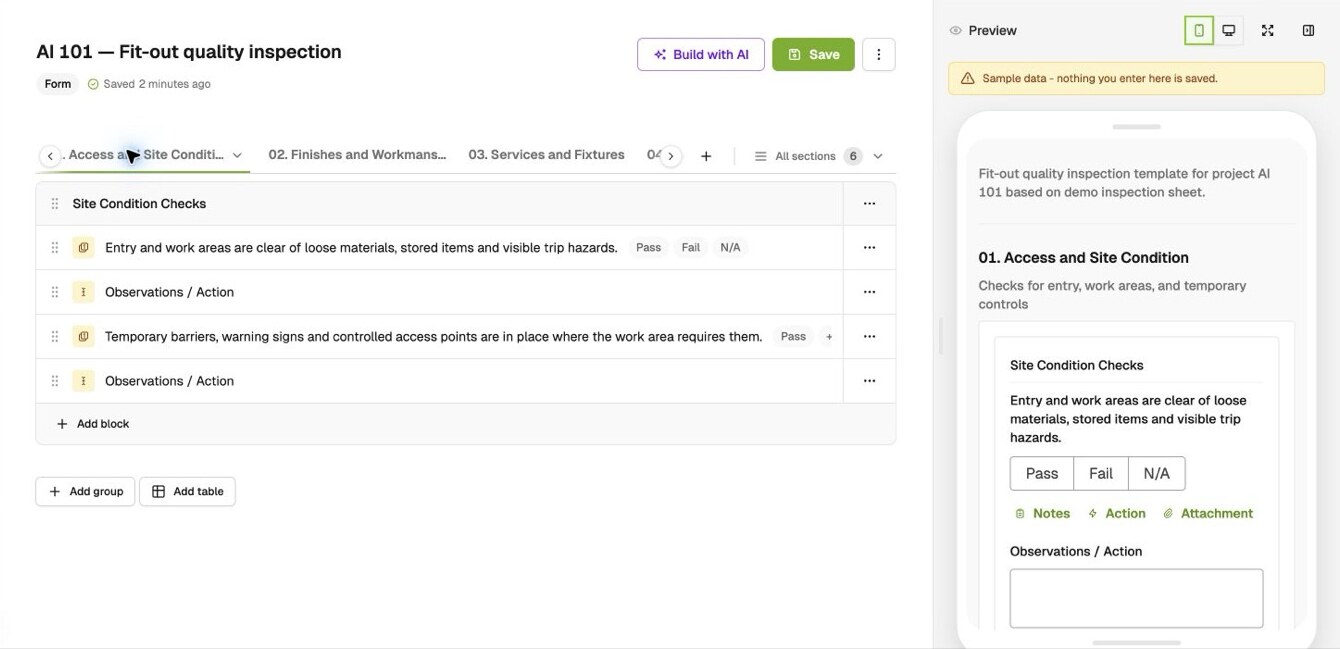
The job builders hand to AI most. Attach the PDF or Word file you already use and get it back as a BuildPass template.
- "Turn this PDF into a reusable inspection template. Keep its sections and items in order, with Pass / Fail / N/A and an observations field for each."
What comes back: a draft template with your sections and items, ready to check and save. - "Make me a steel fabrication ITP."
- "What safety forms should we have on a residential job? Build the five most important."
- "Add a signature block to the end of our pre-start checklist."
Subbies, workers and compliance
- "Which subbies on the Millbrook job have insurance expiring in the next 30 days?"
- "Which companies on the CBD job don't have a SWMS on file?"
- "Which workers on site this week have tickets expiring before the end of the month?"
- "List the inductions waiting for approval on Riverside."
- "Add the working at heights SWMS from our library to the Harbour Street project."
Reports and registers
- "Save a report format called 'Weekly defect report': project, reporting period, executive summary starting with decisions needed, counts of open, overdue and resolved-this-week defects, a breakdown by company, and a register with links."
Then: "Prepare my weekly defect report for Harbour Street using my saved format."
What comes back: the same report, in the same shape, every week. BuildPass Agent can hand it to you as a PDF. - "August HSEQ performance report for this project."
- "Give me a one-page status for every active project: open RFIs, overdue defects and anything missing on compliance."
- "Show me open defects by trade across all my projects, and what keeps going wrong."
Overdue, open and missing
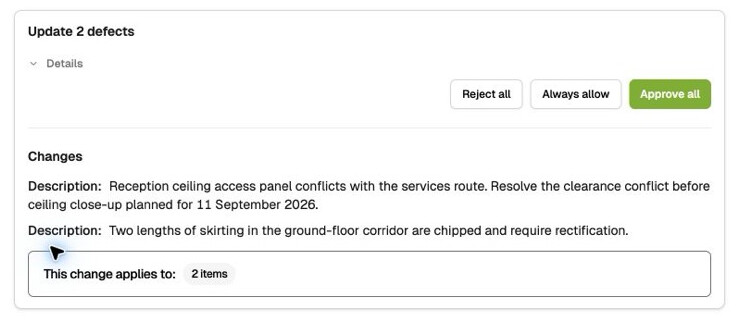
- "Review the unsent defects on Harbour Street. Flag anything missing, suggest clearer descriptions, and show me which ones are ready to send."
What comes back: suggested edits for you to approve. Anything missing information is held back, not invented. - "Which RFIs on Harbour Street have been open for more than 7 days, and who are they waiting on?"
- "Which defects on Riverside are overdue, and who are they assigned to?"
- "How many open defects does each subbie have across all my projects?"
- "Which drawings on the CBD job haven't been reviewed yet?"
Site diaries, sign-ons and daily records
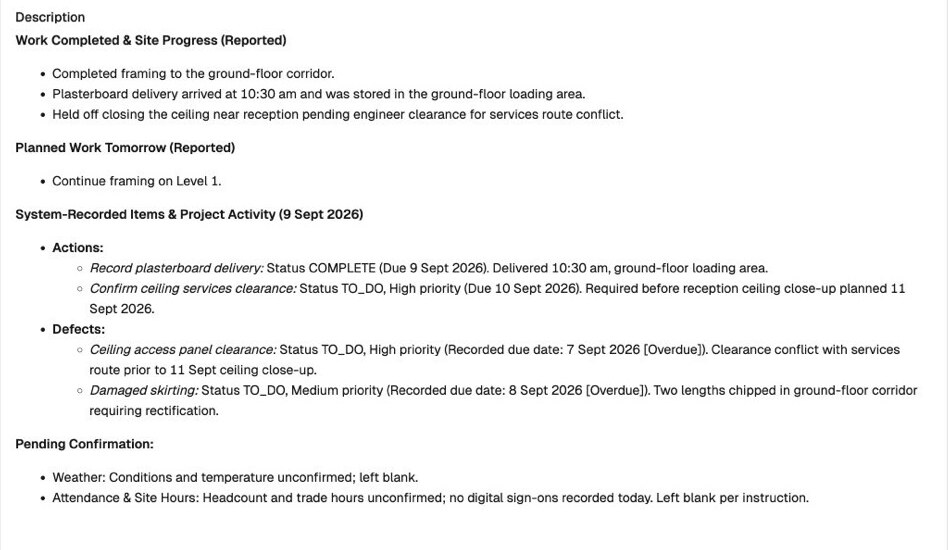
- "Write today's site diary for Harbour Street. Check where we're at in the programme, what defects or actions got raised, and any sign-ons, notes or form responses worth calling out."
What comes back: a draft diary built from the day's records, with blanks where it needs you to confirm things like weather. Add your own update in the next message. - "Summarise this week's site diaries for the CBD job in five bullet points."
- "Who signed on at Riverside yesterday, and how long was each person on site?"
- "Sign out everyone still signed on at Riverside at 5pm yesterday."
- "Show me last week's timesheet hours on the CBD job by cost code."
Programme and RFIs
- "What's scheduled on Harbour Street over the next two weeks?"
- "Which tasks on the Riverside programme are assigned to the electrician this month?"
- "Create an RFI on Harbour Street asking the engineer to confirm the Level 3 slab penetrations, due Friday."
- "List every open RFI across my projects, grouped by the consultant it's with, oldest first."
Find anything
- "Find the document that mentions the balcony threshold set-down."
- "Find the photo of the cracked mirror someone uploaded last week."
- "Which inspection answered 'Fail' on penetrations this month?"
Teach it once
If you ask for the same thing every week, teach it once. In BuildPass Agent:
- "Remember this for Harbour Street: when I say 'Monday triage', review overdue RFIs and open defects, start with decisions needed, then risks, then progress, and draft one chaser per responsible party."
Then every Monday: "Let's do my Monday triage."
What comes back: decisions needed, risks and progress, a table of every overdue item with links, and one draft chaser per person.
Using Claude? Our free Claude skills for builders do the same: they learn how you run meeting prep, reports and chasers, then save your version. If your assistant can run prompts on a schedule, any prompt on this page can run that way, like your morning briefing every weekday at 7am.
Working across your other tools
Connect BuildPass and your other business tools to the same AI assistant, and one prompt can use both.
- Outlook: "Draft a reminder email to each consultant with an RFI open for more than a week." See how to connect BuildPass to Outlook.
- Gmail: "Find the engineer's reply about the slab penetrations in Gmail and add it as a comment on the matching RFI." See how to connect BuildPass to Gmail.
- SharePoint: "Check the specification in SharePoint for the balcony waterproofing detail and raise an RFI to the architect." See how to connect BuildPass to SharePoint.
- Google Drive: "Create a one-page client update for Harbour Street. Use BuildPass for progress and outstanding items, and the project brief in Google Drive for scope and milestones. Call out anything that doesn't line up." See how to connect BuildPass to Google Drive.
- Microsoft Teams: "Summarise what the site team said in Teams about the Level 3 pour, and log any new defects in BuildPass." See how to connect BuildPass to Microsoft Teams.
- Google Calendar: "Prep me for my next site meeting on my calendar with the open RFIs and overdue defects on that project." See how to connect BuildPass to Google Calendar.
- Xero: "Before the payment run, flag every subbie on the aged payables report with expired insurance or no SWMS in BuildPass." See how to connect BuildPass to Xero.
- QuickBooks: "Pull last week's timesheet hours on the CBD job by cost code and draft an invoice in QuickBooks." See how to connect BuildPass to QuickBooks.
- Sage Intacct: "Compare what we owe each subbie in Sage Intacct with their insurance status in BuildPass." See how to connect BuildPass to Sage.
See every tool you can connect on our integrations page.
How to get better answers
Give it four things: what you want, which projects and dates, what it shouldn't do, and what the answer should look like.
- "Review overdue RFIs and open defects on Harbour Street and Kent Road for the last two weeks. Skip anything already resolved. Give me an executive summary and a table with item numbers, due dates, owners and links."
If it gets confused, start a new chat for each new job. If an answer looks wrong, ask it to show you the source.
Frequently asked questions
Do these prompts work in ChatGPT, Claude and Copilot?
Yes, once BuildPass is connected to your assistant. They also work in BuildPass Agent inside BuildPass, with no setup.
Can the AI see projects I'm not on?
No. BuildPass Agent, Claude, ChatGPT and Copilot all work with your BuildPass login, so they only see the projects and records you can.
Will the AI change records without asking?
BuildPass Agent shows you the change and waits for your approval before creating or updating records. In any AI assistant, you can ask to see a change or a draft first and approve it when you're happy.
Do I need to write prompts exactly like these?
No. Ask the way you'd ask your site manager. Say what you want, and let it work out how.
See it on a live account
Not on BuildPass yet? Book a demo and try these prompts on a real project.
More news you'll care about
Don't stop there, the BuildPass blog is filled with interesting insights and innovations that'll help you and your construction business stay ahead of the pack.